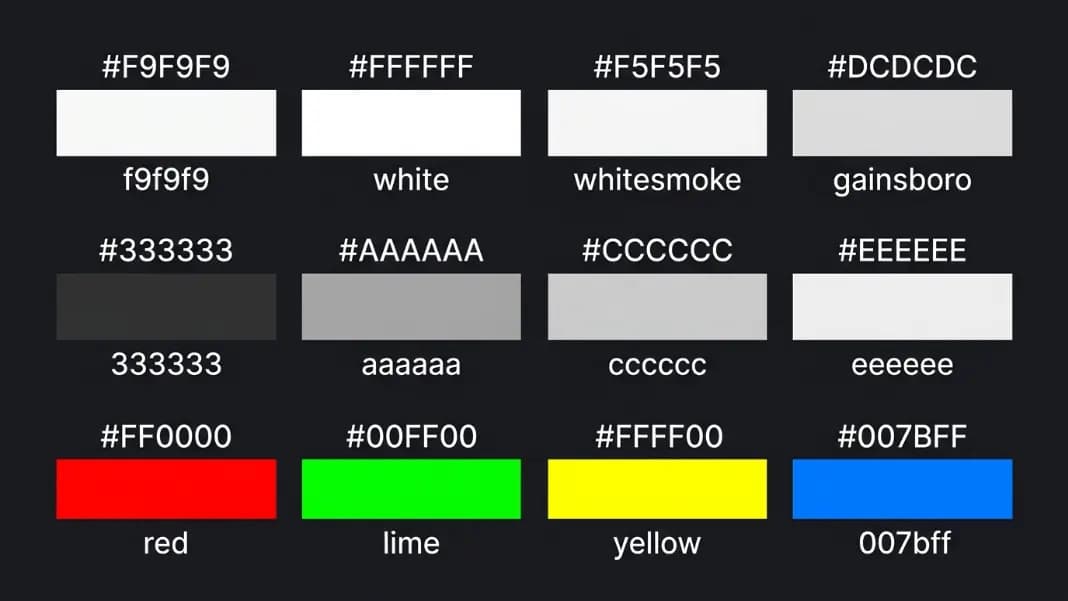
Most hex codes used constantly in production CSS — #f9f9f9, #333333, #cccccc, #007bff — sit in gaps between CSS named colors with no exact match. Knowing what CSS calls them matters when documenting a design system, auditing hardcoded values, or checking whether two slightly different grays resolve to the same named color. One thing worth flagging upfront: some reference sites label #F9F9F9 as "Snow," but Snow is #FFFAFA — a pinkish-white that looks visibly different from the neutral near-white grays this article covers.
The color name finder gives you the exact closest CSS named color for any hex code using Delta-E perceptual matching. But for the specific values that come up constantly in design systems, frameworks, and open-source stylesheets, this guide covers what they are, what CSS calls them, and what designers call them in practice.
One important note before you start: CSS green is not #00FF00, and CSS blue is not #007BFF. The gap between widely-used hex values and their nearest CSS names is sometimes significant, and knowing these gaps in advance saves confusion when converting between color systems.
What f9f9f9 Is Called and Why Every Background Uses It
The hex code #F9F9F9 has no exact CSS named color. It sits between whitesmoke (#F5F5F5) and ghostwhite (#F8F8FF) on the near-white gray scale, and perceptual matching returns one of those two as the closest named color depending on the algorithm.
In design practice, #F9F9F9 is called near-white, off-white, or soft white. It occupies the zone where designers want a page background slightly warmer and less glaring than pure white, without visible gray. On most calibrated monitors at typical brightness, #F9F9F9 reads as white to the eye. Place it next to #FFFFFF and the difference becomes visible, but only just.
The related codes in this near-white zone follow the same pattern:
| Hex | Description | Nearest CSS Named Color |
|---|---|---|
| #FFFFFF | Pure white | white (exact) |
| #FCFCFC | Near-white | white or ghostwhite |
| #FAFAFA | Near-white | white or ghostwhite |
| #F9F9F9 | Near-white | ghostwhite or whitesmoke |
| #F8F8F8 | One step from ghostwhite | ghostwhite (#F8F8FF) |
| #F5F5F5 | Light neutral gray | whitesmoke (exact) |
UI frameworks reach for these specific values because they set background defaults for card containers, sidebar panels, and alternating table rows at values that fall between the CSS named grays. None of them have exact CSS named colors, which is exactly why people search for their names.
The Gray Scale: f4f4f4, f2f2f2, f0f0f0, f1f1f1
These four codes appear together in search data because they occupy the same perceptual zone: light grays that sit just dark enough to be visible against pure white, light enough to read as a background color rather than a surface.
All four fall between whitesmoke (#F5F5F5) and gainsboro (#DCDCDC) on the CSS named gray scale. Whitesmoke is the closest CSS named color in Delta-E perceptual matching for all of them, though gainsboro becomes competitive as you approach #F0F0F0.
Designers use these values when whitesmoke feels too bright and gainsboro feels too dark. The gap between those two named colors is wide enough that four or five unnamed grays fit comfortably between them. You find these values in email template stylesheets where a background is set to a slightly warm gray, and in documentation sites where code blocks need contrast against running text without a harsh visible border.
The practical takeaway: if you see #F4F4F4, #F2F2F2, #F0F0F0, or #F1F1F1 in a stylesheet, they are all performing the same design function. The closest CSS named color for reference purposes is whitesmoke.
fff and ffffff: The Two Ways to Write White
CSS white is #FFFFFF, the maximum value for all three RGB channels. Three-character hex shorthand works by doubling each digit: #FFF expands to #FFFFFF, #000 expands to #000000, #CCC expands to #CCCCCC.
Both fff and ffffff produce identical rendered output in every browser. The short form appears in minified stylesheets. The long form is standard in unminified files and design token documentation where readability matters.
One thing worth being clear about: #FFFFF0 is not white, it is ivory. #FFFAFA is snow. #F0FFF0 is honeydew. These named colors near pure white all carry a slight tint in one channel, which is precisely why #F9F9F9 and its neighbors qualify as genuinely off-white rather than as approximations of a specific named near-white.
Dark Neutrals: 333, 222, 111 and What They Map To
The dark gray shorthand codes are common in design systems as text colors, heading values, and border colors. None have exact CSS named colors.
#333333 is called charcoal or off-black in design documentation. It is genuinely dark but allows the page to feel less stark than pure black. The contrast ratio for #333333 on a white background is approximately 12.6:1, which clears the WCAG AAA threshold of 7:1 comfortably. Many designers prefer it over pure black for body text precisely because it softens maximum contrast without sacrificing readability. You can verify the exact ratio for any pairing with the WCAG contrast checker.
#222222 is darker still. On most screens, the perceptual difference between #222222 and #000000 disappears at normal text sizes without a direct comparison. #111111 is closer to pure black than charcoal is to mid-gray. For practical CSS documentation purposes, all three map to black as their nearest CSS named color, but none are visually indistinguishable from it at scale on a calibrated display.
Common Shorthand Grays: ccc, ddd, eee, aaa
These four three-character codes appear constantly in shorthand CSS and are worth knowing individually.
#AAAAAA (aaa): This one has a near-exact CSS named color. Darkgray is #A9A9A9. The difference between #AAAAAA and #A9A9A9 is one unit in all three RGB channels. Perceptual matching will almost always return darkgray as the closest CSS color for #AAAAAA. It is the closest any common shorthand code gets to an exact CSS named color.
#CCCCCC (ccc): Falls between silver (#C0C0C0) and lightgray (#D3D3D3). In Delta-E matching, lightgray tends to win because #CCCCCC has a lightness value in CIE Lab that sits closer to lightgray than to silver. Designers reach for #CCCCCC for dividers and placeholder text where silver feels too metallic and lightgray is slightly too light.
#DDDDDD (ddd): Sits between lightgray (#D3D3D3) and gainsboro (#DCDCDC). These two named colors are very close to each other, and #DDDDDD falls between them with gainsboro winning in perceptual comparison. This value appears in table separators and border treatments across a large number of UI component libraries.
#EEEEEE (eee): Falls between gainsboro (#DCDCDC) and whitesmoke (#F5F5F5). Whitesmoke tends to be the perceptual winner. Skeleton loading states frequently use #EEEEEE as the shimmer base because it is light enough to feel like a placeholder rather than real content.
Brand Hex Codes: 007bff and 4caf50
Two hex codes appear in search data specifically because they are the signature primary colors of major design frameworks.
#007BFF is the primary blue from Bootstrap 3 and 4, used for buttons, links, and interactive states across millions of Bootstrap-built products. It has no exact CSS named color. The closest in perceptual space is dodgerblue (#1E90FF), though the two are clearly distinguishable when placed side by side. Bootstrap blue is noticeably darker and more saturated than dodgerblue. Anyone working within Bootstrap just calls it Bootstrap blue or primary blue in context.
#4CAF50 is Material Design's Green 500, used for success states, confirmation messages, and action buttons across Google products. Its nearest CSS named color is mediumseagreen (#3CB371), which is somewhat darker and more muted. In direct comparison the difference is clear. The Material Design system refers to this color simply as Green 500 in its color palette documentation.
For identifying what any framework hex code maps to for documentation or code review purposes, paste the code into the color name finder to get the exact perceptual match with a side-by-side comparison. To convert the result to other formats, the color format converter handles hex to RGB, HSL, and shorthand conversion.
The Pure Primary Hex Codes: ff0000, 00ff00, ffff00, 00ffff, ff00ff
These are maximum-saturation values where channels are set to their extremes. Every one of them has an exact CSS named color, and one of them carries the most common naming confusion in CSS.
#FF0000 = red. Exact CSS named color. Maximum red channel, zero green, zero blue.
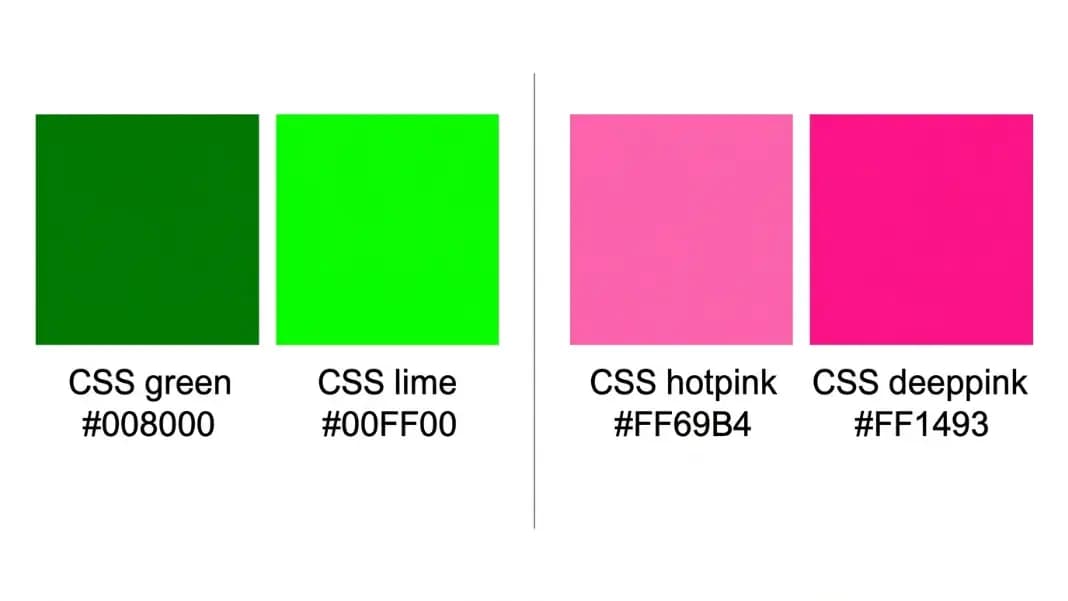
#00FF00 = lime. This is the CSS trap. The correct name for pure maximum green (#00FF00) is lime, not green. CSS green is #008000, a noticeably darker shade. Write color: green in a stylesheet and you get the darker #008000. Write color: lime or color: #00FF00 for the bright neon green. Most developers discover this discrepancy when their green renders darker than expected and they cannot figure out why.
#FFFF00 = yellow. Exact CSS named color. Maximum red and green channels, zero blue. This one matches the name people expect.
#00FFFF = aqua or cyan. Both names are valid CSS for exactly this hex code. Aqua was the original HTML name. Cyan was added in CSS for alignment with the color model. Both render identically in any browser.
#FF00FF = fuchsia or magenta. The same dual-name situation: fuchsia was the original HTML name, magenta was added later. Both map to #FF00FF.
#0000FF = blue. Exact CSS named color. Maximum blue channel, zero red and green.
d9d9d9, ebebeb, fcfcfc: The Middle Grays No One Talks About
Three more specific codes appear regularly in production stylesheets but have no CSS names and come up in documentation questions.
#D9D9D9: A medium-light gray, very close to gainsboro (#DCDCDC). This value appears in Microsoft Office templates and default PowerPoint slide backgrounds, which explains why it shows up in design files exported from those tools. Gainsboro is its nearest CSS match.
#EBEBEB: A light gray used in skeleton loaders and placeholder states in modern UI frameworks including Tailwind-based component libraries. It falls between gainsboro (#DCDCDC) and whitesmoke (#F5F5F5). Whitesmoke tends to win in perceptual matching.
#FCFCFC: Nearly white, one step lighter than #FAFAFA. The nearest CSS name is white or ghostwhite depending on matching method. Designers use this when they want a card surface that is barely distinguishable from a white page background without the flattening effect of using the same value.
How to Find the CSS Name for Any Hex Code You Encounter
The method is direct: paste the hex into the color name finder and the tool converts it to CIE Lab color space, measures the Delta-E distance to all 140 CSS named colors, and returns the closest match. The side-by-side preview lets you judge whether the match is close enough for your purpose.
For the near-white grays, the closest CSS named color will almost always be white, ghostwhite, whitesmoke, or gainsboro. The match will be visually similar but not exact, which matters when you are deciding whether to replace a hardcoded value with a named color or keep the specific hex.
For building a complete neutral gray scale that documents the full range from the near-white backgrounds to the dark text values, the tints and shades generator produces 11 steps from white to black through any input color. This is how most design systems capture their neutral gray scale without depending on the sparse set of CSS named grays. The full set of color tools is in the color tools section, including the tools for palette building, format conversion, and accessibility checking.
If you are looking for the names used for skin tones, paint colors, or the broader vocabulary around specific hue families, the skin color names guide covers the professional terms designers and writers actually use for human skin tones with their hex codes.