Free Online Color Tools for Designers and Developers
Pick colors from images, generate palettes and schemes, check WCAG contrast ratios, build CSS gradients, create tints and shades, and convert between HEX, RGB, HSL, and CSS variables. Every color tool runs free in your browser with no account required.
Color Palette Generator
Generate harmonious 5-color palettes from any starting hue.
CSS Gradient Generator
Build linear and radial CSS gradients with live preview.
WCAG Contrast Checker
Test color pairs against WCAG 2.1 AA and AAA standards.
CSS Box Shadow Generator
Generate CSS box shadows with slider controls and live preview.
Color Format Converter
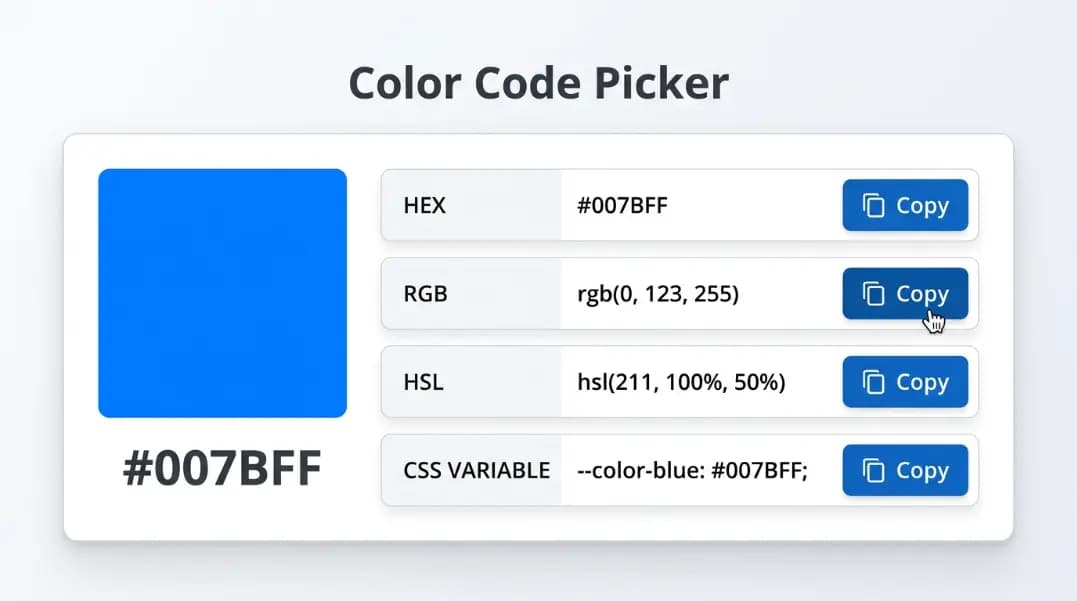
Convert HEX to RGB, HSL, RGBA, and CSS custom properties.
Tints and Shades Generator
Generate a full 11-step color scale from any hex color.
Color Scheme Generator
Generate complementary, analogous, and triadic color schemes.
Color Name Finder
Find the closest CSS named color for any HEX code.
Image Color Extractor
Upload an image and extract its dominant color palette.
9
Color tools
WCAG 2.1
Contrast standard
HEX · RGB · HSL
Output formats
100%
Browser-based
Color scale preview
The tints and shades generator produces a full 11-step scale from any base color, matching Tailwind's 50–950 naming convention.
50
100
200
300
400
500
600
700
800
900
Color combinations that convert
High-performing UI color pairings with WCAG contrast ratios. Use the contrast checker to verify any pair before using in production.
Main action buttons, checkout, sign up
Confirmation messages, success badges
Warning alerts, caution states
Navigation bars, hero backgrounds
Category tags, filter pills, badges
Error states, delete confirmation, alerts
Color tools online for every stage of design
Color decision-making starts at the beginning of a design project and carries through to the final line of CSS. Start with palette generation to establish primary, secondary, and accent colors. Use the tints and shades generator to build a complete 11-step scale for each base color. Run the WCAG contrast checker to confirm that every foreground and background combination meets AA or AAA requirements before your design reaches production.
The color scheme generator covers complementary, analogous, triadic, split-complementary, tetradic, and monochromatic relationships. The image color picker extracts a dominant palette from any photo. The color name finder maps any HEX value to the nearest named CSS color.
Color picker from image and color extraction tools
The most-used tool on this page for designers working from visual references is the image color picker. Upload any photo and the color extractor identifies the dominant hues using pixel frequency analysis and perceptual distance filtering. Each extracted color comes with its HEX, RGB, and HSL code ready to copy. All image processing runs in your browser. The photo is never sent to a server.
To go from a photo to a complete design system: extract colors from the image, take the most prominent HEX, and feed it into the color palette generator to build a 5-color harmony palette, or into the scheme generator to apply color theory relationships. Use the tints and shades generator to build a 50–950 scale for each hue. This workflow takes you from a single image to a production-ready token system.
Color converter tools and color code finders
The color converter tool handles every standard CSS format: HEX, RGB, RGBA, HSL, HSLA, and OKLCH. Enter any value in any format and the tool converts it to all other formats simultaneously. This is useful for translating design tool output (usually HEX) into CSS custom properties or HSL values for dynamic color manipulation.
The color name finder works the other way: enter a HEX value and it identifies the closest CSS named color using Delta-E perceptual distance. Useful for finding readable color names for documentation, prototyping with named values instead of hex codes, or understanding what named color your brand HEX is closest to. The full list of 140 CSS and HTML named colors is browsable and searchable in the tool.
CSS gradient and shadow generators
The CSS gradient generator builds linear, radial, and text gradients with live preview. Add as many color stops as needed, adjust direction and position, and copy the complete CSS declaration. Tailwind export is included for gradient utility class output.
The CSS box shadow generator gives you interactive controls for offset, blur, spread, color, and inset mode. Layer multiple shadows, preview them against a live card, and copy the complete box-shadow value. Preset styles covering soft UI, material elevation, neon glow, and focus rings are available as starting points.
CSS output and developer-ready export
All nine free color tools produce CSS-ready output. The palette generator exports CSS custom properties. The gradient maker generates the complete background declaration. The color format converter produces HEX, RGB, RGBA, HSL, and CSS variable output simultaneously. The tints and shades generator outputs a complete Tailwind-compatible color object. Results update in real time as you adjust inputs, and every tool includes a one-click copy button for the output.
For image-based workflows, the hex color picker from image returns values that paste directly into any design tool or CSS file. The image to color code pipeline (upload, extract, copy HEX) takes under ten seconds and produces values compatible with Figma, Sketch, Adobe XD, VS Code, and any browser DevTools color picker.
Frequently asked questions
Upload your image to the color picker from image tool on this page. The tool analyzes pixel data using the Canvas API and extracts the dominant colors automatically, returning each one with its HEX, RGB, and HSL values. All processing happens in your browser. No image is uploaded to any server.
Use the image color picker tool. Upload any JPEG, PNG, or WebP photo and the tool identifies the most dominant colors and displays their HEX codes directly. Click any swatch to copy the HEX code to your clipboard. For a single pixel, use your browser's built-in DevTools eyedropper for pixel-level precision.
The color extractor from image tool accepts any browser-supported image format. After uploading, the algorithm scales the image, builds a pixel frequency map using color quantization, and returns the most visually distinct dominant colors with their HEX, RGB, and HSL values. You can then export the palette as CSS custom properties.
Upload your image to the color picker from image tool to extract the dominant colors. Then take the most prominent extracted HEX and enter it into the color palette generator to build a full 5-color harmony palette based on color theory, or into the color scheme generator for complementary, analogous, and triadic variations.
Yes. All color tools use standard browser APIs including the Canvas API for image processing and CSS parsing for color conversion. They work in Chrome, Firefox, Safari, and Edge without any extension or plugin.
Yes. The palette generator, tints and shades generator, and gradient maker all include Tailwind-compatible output. The tints and shades tool matches Tailwind's 50–950 color scale naming convention exactly.
The contrast checker uses the WCAG 2.1 relative luminance formula exactly as defined in the specification. Results match Google Lighthouse, WebAIM Contrast Checker, and other industry-standard tools.
The right color tool depends on your starting point. If you have an image, use the color picker from image to extract dominant colors. If you have a brand hex code, use the palette generator or tints and shades generator to build a full color system from it. If you need to check accessibility, the WCAG contrast checker gives you exact ratios against the AA and AAA standards.
From the blog
All articles →
12 min read
Color Schemes Generator: How to Build Color Palettes That Work
Generate complementary, analogous, triadic, and other color schemes online. Learn how color harmony types are defined, when to use each, and how to turn a palette into a usable design system.

10 min read
CSS Gradient Maker: Create Linear and Radial Gradients Online
Build CSS gradients visually and copy the code. Covers linear-gradient and radial-gradient syntax, gradient angle directions, color stops, and common gradient design patterns.

11 min read
CSS Named Colors: Complete List with Hex Codes
All 148 CSS named colors with hex codes and RGB values, including which are aliases, which version of CSS added them, and the story behind rebeccapurple.

12 min read
Shades of Orange: Color Names, Hex Codes, and Variations
Orange color names and hex codes: burnt orange, tangerine, amber, coral, peach, vermillion, and terracotta. Every named shade with HEX value for CSS and design.

9 min read
WCAG Color Contrast: The 4.5:1 Rule Explained
What the 4.5:1 WCAG contrast ratio requires, how relative luminance is calculated, where AA and AAA thresholds apply, and why #767676 on white fails.
11 min read
CSS Color Formats: HEX, RGB, HSL and When to Use Each
Learn CSS color formats: HEX, RGB, RGBA, HSL, HSLA, CSS variables, and Tailwind JIT. Understand exactly which format to use and why, with a free converter.