You type color: green in a CSS file and the text appears in a dark, almost forest-like green rather than the bright green you expected. That is because CSS green is #008000, a half-brightness value inherited from the original HTML 4.01 palette. The bright primary green is lime in CSS. This small distinction trips up developers regularly, and it is one of several things about CSS named colors that behave differently from what the name alone suggests.
The color name finder lets you look up any of the 148 CSS named colors by name or hex code and see the exact values instantly. This guide covers the full list organized by color family, explains where each group came from, identifies the alias pairs, and flags which named colors create accessibility problems.
Where CSS Named Colors Come From
CSS did not originate its color names. The list traces back to the X Window System developed at MIT in 1985. X11 included a human-readable color file for graphical interfaces containing hundreds of color names with RGB values. When the web emerged in the early 1990s, HTML inherited a subset of these.
HTML 4.01 (1997) formally defined 16 named colors based on the VGA 16-color palette. These became the baseline every browser had to support. SVG (Scalable Vector Graphics) adopted the broader X11 color list in 2001. When CSS Color Level 3 was published in 2011, it incorporated the SVG named color list, expanding the CSS keyword set from 17 to 147. CSS Color Level 4 (2022) added one more: rebeccapurple. The total is now 148 accepted named color keywords.
The apparent discrepancy across sources: many articles cite 140 because they count only unique hex values and treat alias pairs as single entries. The CSS specification itself lists 148 keywords, counting each alias spelling separately.
The 16 Original CSS Named Colors
These 16 keywords come from HTML 4.01 and map to the VGA 16-color palette. Every CSS-capable browser has supported them since the late 1990s. A critical detail: in this original palette, green is #008000, a half-brightness green. The full-brightness green is lime. CSS 2.1 added orange as the 17th named color.
| Name | Hex | RGB |
|---|---|---|
| aqua | #00FFFF | 0, 255, 255 |
| black | #000000 | 0, 0, 0 |
| blue | #0000FF | 0, 0, 255 |
| fuchsia | #FF00FF | 255, 0, 255 |
| gray | #808080 | 128, 128, 128 |
| green | #008000 | 0, 128, 0 |
| lime | #00FF00 | 0, 255, 0 |
| maroon | #800000 | 128, 0, 0 |
| navy | #000080 | 0, 0, 128 |
| olive | #808000 | 128, 128, 0 |
| purple | #800080 | 128, 0, 128 |
| red | #FF0000 | 255, 0, 0 |
| silver | #C0C0C0 | 192, 192, 192 |
| teal | #008080 | 0, 128, 128 |
| white | #FFFFFF | 255, 255, 255 |
| yellow | #FFFF00 | 255, 255, 0 |
Notice that navy and maroon are the 50% brightness versions of blue and red respectively. olive is 50% red + 50% green with no blue (a dark yellow-green). The original 16 followed a strict 8-color, 16-color doubling pattern inherited from the VGA palette.
What Is rebeccapurple?
rebeccapurple (#663399) was added to the CSS Color Level 4 specification in June 2014. The name honors Rebecca Meyer, the six-year-old daughter of CSS educator and author Eric Meyer. Rebecca died of brain cancer on June 7, 2014, her birthday.
Eric Meyer is one of the best-known CSS educators on the web, having written definitive guides to CSS layout and cofounded An Event Apart. After Rebecca's death, the web development community proposed naming a CSS color after her as a tribute. The CSS Working Group, which governs the CSS specification, approved the name within days.
The specific name rebeccapurple was Eric Meyer's request. Rebecca had recently told him she was old enough to be called Rebecca rather than Becca. rebeccapurple honors that request. The hex value #663399 encodes equal red and blue channels (both at 102 out of 255) and no green, producing a medium-dark purple that was her favorite shade.
It is the only CSS named color added specifically to honor a person. The addition was supported by browser vendors and the W3C without objection, reflecting the respect the community had for Meyer's contribution to the discipline.

What Are the CSS Color Aliases?
CSS includes named color pairs where two different keywords produce the same hex value. These aliases reconcile the older HTML 4.01 names with the X11 names used in the SVG specification.
The two color aliases:
| Keyword | Alias | Hex | Origin |
|---|---|---|---|
| aqua | cyan | #00FFFF | aqua from HTML 4.01, cyan from X11 |
| fuchsia | magenta | #FF00FF | fuchsia from HTML 4.01, magenta from X11 |
Seven additional aliases exist for gray spelling variants. Both American English (gray) and British English (grey) spellings are accepted for each:
| Color name | Hex |
|---|---|
| gray / grey | #808080 |
| darkgray / darkgrey | #A9A9A9 |
| lightgray / lightgrey | #D3D3D3 |
| dimgray / dimgrey | #696969 |
| slategray / slategrey | #708090 |
| darkslategray / darkslategrey | #2F4F4F |
| lightslategray / lightslategrey | #778899 |
All 9 alias relationships produce identical computed color values. There is no visual or behavioral difference between writing cyan and aqua, or gray and grey, in any CSS property.
CSS Named Colors by Family
Key CSS named colors organized by color family, with hex and RGB values. The color name finder has the complete 148-keyword interactive reference with search by name or hex.
Reds and pinks
| Name | Hex | RGB |
|---|---|---|
| red | #FF0000 | 255, 0, 0 |
| darkred | #8B0000 | 139, 0, 0 |
| firebrick | #B22222 | 178, 34, 34 |
| crimson | #DC143C | 220, 20, 60 |
| indianred | #CD5C5C | 205, 92, 92 |
| lightcoral | #F08080 | 240, 128, 128 |
| salmon | #FA8072 | 250, 128, 114 |
| lightsalmon | #FFA07A | 255, 160, 122 |
| coral | #FF7F50 | 255, 127, 80 |
| tomato | #FF6347 | 255, 99, 71 |
| hotpink | #FF69B4 | 255, 105, 180 |
| deeppink | #FF1493 | 255, 20, 147 |
| pink | #FFC0CB | 255, 192, 203 |
| lightpink | #FFB6C1 | 255, 182, 193 |
hotpink and deeppink are named for the same hue but differ significantly in saturation: hotpink at RGB(255, 105, 180) is a brighter magenta-pink, while deeppink at RGB(255, 20, 147) is almost fully saturated. The difference between them at the RGB level is in the green channel: 105 vs 20.
Oranges and yellows
| Name | Hex | RGB |
|---|---|---|
| orange | #FFA500 | 255, 165, 0 |
| darkorange | #FF8C00 | 255, 140, 0 |
| orangered | #FF4500 | 255, 69, 0 |
| gold | #FFD700 | 255, 215, 0 |
| yellow | #FFFF00 | 255, 255, 0 |
| lightyellow | #FFFFE0 | 255, 255, 224 |
| lemonchiffon | #FFFACD | 255, 250, 205 |
| khaki | #F0E68C | 240, 230, 140 |
| darkkhaki | #BDB76B | 189, 183, 107 |
CSS orange (#FFA500) and gold (#FFD700) are often confused. Both have maximum red (255). The difference is in the green channel: orange has 165 and gold has 215. Higher green pushes the color toward yellow, which is why gold appears more yellow-toned than orange even though both are fully red at the R channel. The shades of orange color names guide covers the broader orange family including burnt orange, terracotta, and amber, which are not CSS named colors.
Greens
| Name | Hex | RGB |
|---|---|---|
| lime | #00FF00 | 0, 255, 0 |
| green | #008000 | 0, 128, 0 |
| darkgreen | #006400 | 0, 100, 0 |
| limegreen | #32CD32 | 50, 205, 50 |
| forestgreen | #228B22 | 34, 139, 34 |
| seagreen | #2E8B57 | 46, 139, 87 |
| mediumseagreen | #3CB371 | 60, 179, 113 |
| springgreen | #00FF7F | 0, 255, 127 |
| chartreuse | #7FFF00 | 127, 255, 0 |
| greenyellow | #ADFF2F | 173, 255, 47 |
| yellowgreen | #9ACD32 | 154, 205, 50 |
| olivedrab | #6B8E23 | 107, 142, 35 |
| olive | #808000 | 128, 128, 0 |
| darkolivegreen | #556B2F | 85, 107, 47 |
| palegreen | #98FB98 | 152, 251, 152 |
| lightgreen | #90EE90 | 144, 238, 144 |
| honeydew | #F0FFF0 | 240, 255, 240 |
The shades of green color names guide covers CSS and non-CSS greens side by side, including emerald (#50C878), hunter green (#355E3B), and seafoam, which do not appear in the CSS named color list.
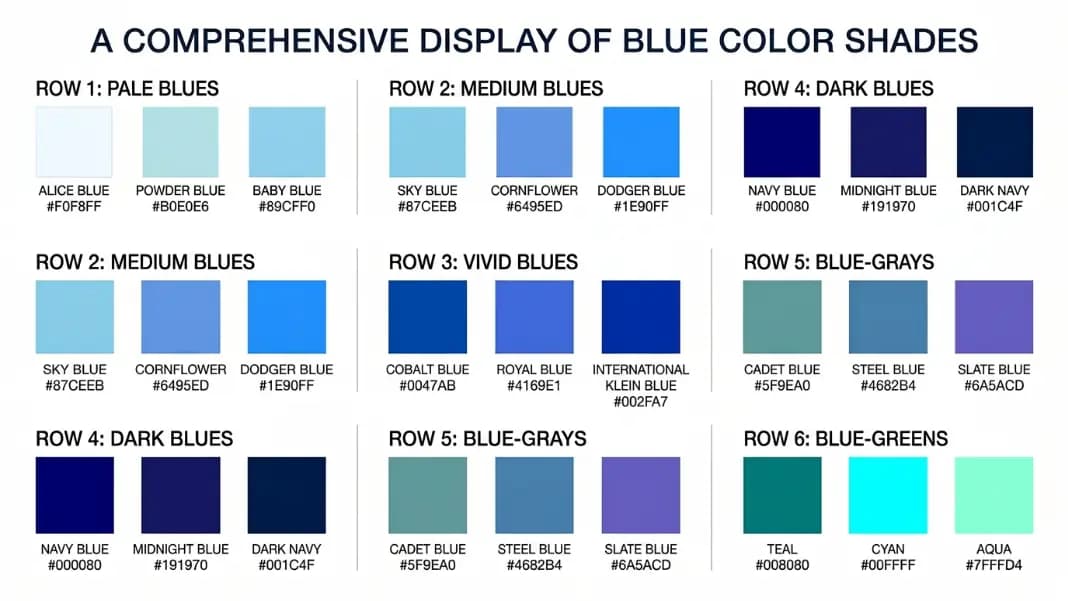
Blues and cyans
| Name | Hex | RGB |
|---|---|---|
| blue | #0000FF | 0, 0, 255 |
| darkblue | #00008B | 0, 0, 139 |
| mediumblue | #0000CD | 0, 0, 205 |
| navy | #000080 | 0, 0, 128 |
| royalblue | #4169E1 | 65, 105, 225 |
| steelblue | #4682B4 | 70, 130, 180 |
| dodgerblue | #1E90FF | 30, 144, 255 |
| cornflowerblue | #6495ED | 100, 149, 237 |
| skyblue | #87CEEB | 135, 206, 235 |
| lightskyblue | #87CEFA | 135, 206, 250 |
| deepskyblue | #00BFFF | 0, 191, 255 |
| cadetblue | #5F9EA0 | 95, 158, 160 |
| lightblue | #ADD8E6 | 173, 216, 230 |
| powderblue | #B0E0E6 | 176, 224, 230 |
| aliceblue | #F0F8FF | 240, 248, 255 |
| cyan / aqua | #00FFFF | 0, 255, 255 |
| darkcyan | #008B8B | 0, 139, 139 |
| teal | #008080 | 0, 128, 128 |
| turquoise | #40E0D0 | 64, 224, 208 |
| aquamarine | #7FFFD4 | 127, 255, 212 |
skyblue and lightskyblue share identical red and green values (135, 206) but differ only in the blue channel: 235 vs 250. The effect is subtle: lightskyblue appears slightly more intensely blue while skyblue reads as slightly more gray-toned.
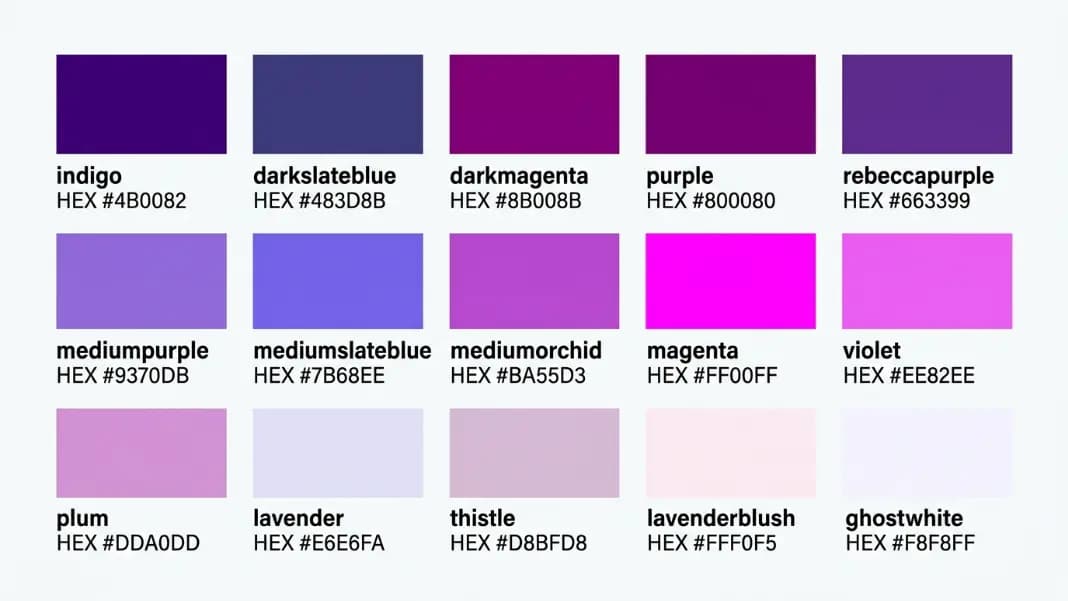
Purples and violets
| Name | Hex | RGB |
|---|---|---|
| purple | #800080 | 128, 0, 128 |
| darkviolet | #9400D3 | 148, 0, 211 |
| darkorchid | #9932CC | 153, 50, 204 |
| darkmagenta | #8B008B | 139, 0, 139 |
| rebeccapurple | #663399 | 102, 51, 153 |
| blueviolet | #8A2BE2 | 138, 43, 226 |
| indigo | #4B0082 | 75, 0, 130 |
| violet | #EE82EE | 238, 130, 238 |
| orchid | #DA70D6 | 218, 112, 214 |
| mediumpurple | #9370DB | 147, 112, 219 |
| plum | #DDA0DD | 221, 160, 221 |
| lavender | #E6E6FA | 230, 230, 250 |
| thistle | #D8BFD8 | 216, 191, 216 |
| fuchsia / magenta | #FF00FF | 255, 0, 255 |
The shades of purple color names guide covers the full purple-violet-lavender spectrum with additional names like mauve, amethyst, and wisteria that are not CSS keywords.
Browns and earth tones
| Name | Hex | RGB |
|---|---|---|
| brown | #A52A2A | 165, 42, 42 |
| saddlebrown | #8B4513 | 139, 69, 19 |
| sienna | #A0522D | 160, 82, 45 |
| chocolate | #D2691E | 210, 105, 30 |
| peru | #CD853F | 205, 133, 63 |
| tan | #D2B48C | 210, 180, 140 |
| burlywood | #DEB887 | 222, 184, 135 |
| wheat | #F5DEB3 | 245, 222, 179 |
| moccasin | #FFE4B5 | 255, 228, 181 |
| peachpuff | #FFDAB9 | 255, 218, 185 |
| bisque | #FFE4C4 | 255, 228, 196 |
| sandybrown | #F4A460 | 244, 164, 96 |
| rosybrown | #BC8F8F | 188, 143, 143 |
| cornsilk | #FFF8DC | 255, 248, 220 |
Whites, grays, and black
| Name | Hex | RGB |
|---|---|---|
| white | #FFFFFF | 255, 255, 255 |
| snow | #FFFAFA | 255, 250, 250 |
| ivory | #FFFFF0 | 255, 255, 240 |
| floralwhite | #FFFAF0 | 255, 250, 240 |
| ghostwhite | #F8F8FF | 248, 248, 255 |
| whitesmoke | #F5F5F5 | 245, 245, 245 |
| seashell | #FFF5EE | 255, 245, 238 |
| linen | #FAF0E6 | 250, 240, 230 |
| oldlace | #FDF5E6 | 253, 245, 230 |
| antiquewhite | #FAEBD7 | 250, 235, 215 |
| silver | #C0C0C0 | 192, 192, 192 |
| lightgray | #D3D3D3 | 211, 211, 211 |
| gainsboro | #DCDCDC | 220, 220, 220 |
| gray | #808080 | 128, 128, 128 |
| darkgray | #A9A9A9 | 169, 169, 169 |
| dimgray | #696969 | 105, 105, 105 |
| slategray | #708090 | 112, 128, 144 |
| lightslategray | #778899 | 119, 136, 153 |
| darkslategray | #2F4F4F | 47, 79, 79 |
| black | #000000 | 0, 0, 0 |
slategray (#708090) is distinctive in the gray family because it has a blue tint: the blue channel (144) is higher than the red (112) and green (128) channels. This gives it a cool, steel-blue tone that distinguishes it from the purely neutral grays like gray (#808080) where all three channels are equal.
Which CSS Named Colors Fail Accessibility Contrast?
WCAG 2.1 Level AA requires a minimum contrast ratio of 4.5:1 for normal body text against its background, and 3:1 for large text (18pt or 14pt bold). Several popular CSS named colors fail these thresholds when used as text on white.
orange (#FFA500) has a contrast ratio of approximately 1.92:1 against white (#FFFFFF). It fails WCAG at every conformance level. yellow (#FFFF00) against white is 1.07:1, nearly invisible as text. lime (#00FF00) against white is 1.37:1. gold (#FFD700) against white is 1.28:1. These are safe for borders, backgrounds, icons, and decorative elements. They should not be used for body text on light backgrounds.
Colors that pass WCAG AA on white include most of the dark CSS named colors: navy (15.0:1), darkgreen (8.37:1), maroon (8.32:1), darkslategray (10.7:1), saddlebrown (4.83:1), and indigo (9.86:1). Use the contrast checker to verify any color combination before shipping text that uses named colors.
One specific trap: green (#008000) passes WCAG AA on white at approximately 5.13:1, but lime (#00FF00), despite being the brighter green, fails at 1.37:1. The counterintuitive result is that the darker CSS green passes accessibility requirements while the brighter one fails badly.
Named Colors vs. Hex Codes: When to Use Which
color: red and color: #FF0000 are identical instructions to the browser. Named colors do not carry special behavior or different performance characteristics. The choice is purely about readability and flexibility.
Named colors work well for common colors where the name communicates intent without ambiguity: white, black, transparent, and simple accent colors in utility classes or debug stylesheets. Writing border: 1px solid black or background: white is immediately readable without needing to parse a hex value.
Hex codes (or HSL) are necessary for any color outside the 148 named keywords, which is almost every brand or design system color. A design system will specify #1A73E8, not cornflowerblue (#6495ED), because no named color exists at exactly that blue. Precision and custom palette control require hex or functional notation.
One practical use of the named colors: they establish a shared vocabulary for quick communication. Saying a button is steelblue in a team discussion conveys the approximate hue more quickly than reciting a hex code. The color name finder identifies the nearest CSS named color to any hex value, which is useful for converting custom brand colors into the closest standard keyword for documentation or communication. The tints and shades generator creates systematic lighter and darker variants of any color, named or hex, for building scale-based design system palettes.
The color tools section has the color name finder, contrast checker, and tints and shades generator alongside other utilities for CSS color work.