You give a team 10 minutes for a task and walk away. When you return, they are still setting up. You give the same team 10 minutes with a large countdown timer visible on the wall. They finish in 8.
The countdown timer at ToolCenterHub runs in any browser, scales to full screen for display in front of a group, and requires nothing beyond opening the page. This guide covers why visible countdown timers change group behavior, what the research says about the optimal durations for specific use cases, and how to run a countdown timer effectively for classrooms, presentations, team meetings, and events.
How an Online Countdown Timer Works
An online countdown timer takes a time you set and decrements it every second until it reaches zero. The timer uses the browser's internal clock, which syncs to the device's system time. Once the page loads, the countdown runs accurately without requiring an active internet connection.
At zero, the timer alerts with a sound, a visual flash, or both. Most browser-based timers continue running as long as the tab is open and the device screen is not sleeping. Setting the device to "never sleep" or using a full-screen mode that prevents the screen from dimming keeps the timer visible throughout the activity.
The countdown timer is in the random tools category alongside other time and decision tools. Unlike a stopwatch that measures elapsed time, a countdown timer makes the remaining time visible, which is what produces the behavioral effect described below.
Why Visible Countdown Timers Change Group Behavior
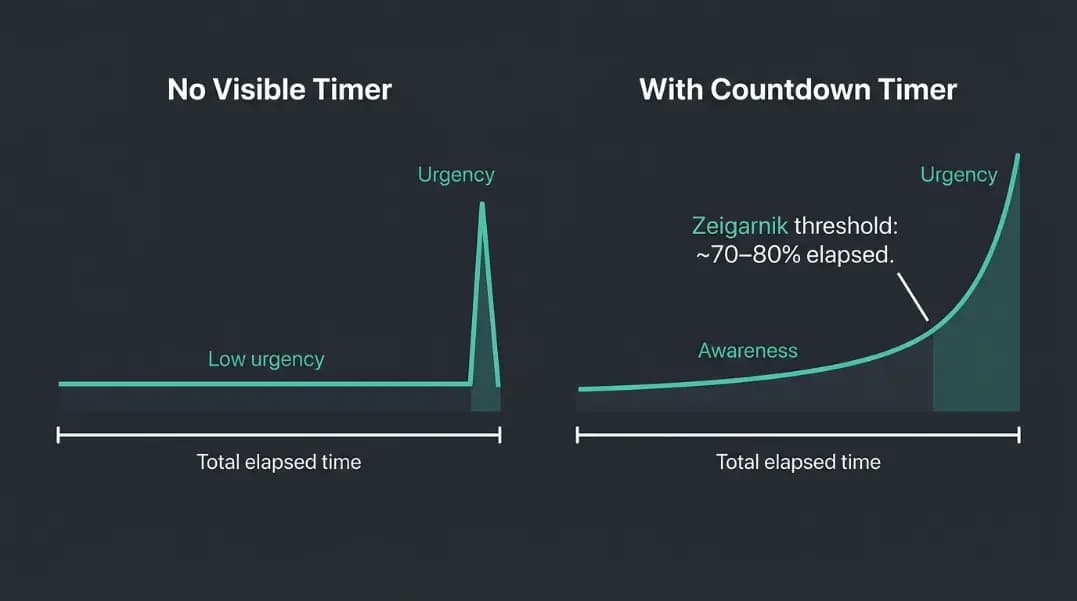
The Zeigarnik effect is the psychological phenomenon where unfinished tasks hold more active mental attention than completed ones. Bluma Zeigarnik documented this in 1927: people remember interrupted tasks better and think about them more persistently until they are finished.
A visible countdown timer leverages this directly. When a deadline is explicit and visible, the task remains mentally open in every participant's awareness until the counter reaches zero. The group does not need to track time internally because the timer does it externally, freeing cognitive resources to focus on the task itself.
The timing of peak urgency is predictable. Research on time-pressure effects consistently shows that the transition from exploratory behavior to solution-focused behavior happens when approximately 20 to 30 percent of the available time remains. With a 10-minute timer, this shift occurs around the 7-minute mark. With a 5-minute timer, around the 3.5-minute mark. The visible countdown makes this threshold tangible, which is why groups with a countdown finish tasks in less time than groups working under a stated duration without a visual.
Invisible deadlines, such as telling a group "you have 10 minutes," produce less urgency because the clock is not anchored to anything visible. Participants underestimate elapsed time and overestimate remaining time consistently.
Countdown Timer Durations by Use Case
Optimal durations are not arbitrary. Each use case has a range where the timer adds value without creating unnecessary stress or being so long that the effect disappears.
| Use Case | Recommended Duration | Notes |
|---|---|---|
| Partner discussion (think-pair-share) | 2 to 3 min | Short enough to force concise exchange |
| Classroom transition or cleanup | 3 to 5 min | Enough time to finish without dragging |
| Group problem-solving task | 8 to 12 min | Allows exploration before urgency builds |
| Independent written response | 5 to 10 min | Duration depends on expected output length |
| Extended independent work (reading, project) | 15 to 25 min | Pomodoro range for sustained focus |
| Presentation Q&A (per question) | 2 to 3 min | Keeps answers focused without cutting off |
| Meeting agenda item (status update) | 2 to 3 min | Self-policing; avoids status turning into discussion |
| Meeting agenda item (problem-solving) | 8 to 15 min | Depends on complexity and prep level |
| Event activity or team challenge | 5 to 15 min | Visible to all; creates shared urgency |
| Cooking or break timer | 10 to 30 min | No group psychology required; pure function |
Setting the timer 10 to 20 percent shorter than the task actually needs prompts earlier convergence without cutting off necessary work. Groups calibrate to the time given: if given 15 minutes for a 10-minute task, they fill 15 minutes. If given 10 minutes for a 10-minute task, they finish in 10.
Using a Countdown Timer in the Classroom
A countdown timer projected at the front of a classroom replaces verbal time reminders and lets the teacher focus on circulating and observing rather than managing the clock.
Transitions: The most common classroom timer use is transitions: packing up, moving to a new location, or switching from individual to group work. A 3 to 5 minute countdown at the end of an activity removes the need to repeat the instruction and reduces the dragging that happens when students have no visible pressure to finish.
Group tasks: For group problem-solving or project work, display the timer on the class screen and leave it visible throughout the activity. Do not reset or extend the timer unless a genuine logistical issue arises. Students who know the timer will be extended start treating the countdown as a suggestion rather than a deadline, and the urgency effect disappears.
Quick writes and warm-ups: A 5 to 10 minute timer for a written response or warm-up problem gives students a clear endpoint and reduces the anxiety of open-ended "write until I say stop" instructions. Seeing the timer count down tells students how much to write rather than requiring them to guess how long is expected.
Managing fairness perception: When random selection tools like the random number generator or spinner are used to pick which student presents or answers, pairing selection with a timer visible to all students removes the perception that time allocations vary by who is called on. Every student gets the same countdown.
Using a Countdown Timer for Presentations
Countdown timers serve two distinct roles in presentations: managing the presenter's own time and managing audience participation.
Presenter time management: A small secondary countdown visible only to the presenter, typically on a laptop screen while the audience sees the main slides, keeps pace without putting time pressure on the audience. The presenter sees the countdown; the audience focuses on the content. This avoids the attention split that happens when a shared screen shows both the content and a visible timer.
Q&A management: Displaying a 2 to 3 minute countdown for audience questions keeps each exchange focused. Speakers and questioners both calibrate to the visible time remaining. Questions become more specific, and answers become more direct. Without a visible limit, Q&A sections consistently run over because neither party has a shared reference for when to wrap up.
Breakout exercises: For any activity where the audience breaks into pairs or small groups, a full-screen countdown on the shared screen gives every group the same clock. They self-manage instead of waiting to be told to stop, which reduces the disruption of ending the activity and returning to the main session.
Using a Countdown Timer for Team Meetings and Events
Per-agenda-item timing: Full-meeting timers are less effective than per-agenda-item timers for keeping discussions focused. A 60-minute meeting countdown tells attendees the meeting ends in an hour but does not create urgency around individual items. A 5-minute countdown for a status update creates immediate pressure for concise delivery.
Display the countdown for each agenda item as it starts. When the timer ends, the facilitator decides whether to allow a 2-minute extension or move on. This structure makes overruns explicit and deliberate rather than passive.
Team challenges and events: For any timed group competition or activity, a visible shared countdown removes disputes about elapsed time and makes the ending moment unambiguous. Whether the challenge involves the wheel spinner for random team assignments or a structured task with fixed outputs, the countdown creates a shared urgency that pure verbal instructions do not.
Retrospectives and standup meetings: Agile teams use countdown timers in standup meetings (typically 1 to 2 minutes per person for teams of 5 to 7) and retrospective activities (5 to 8 minutes per phase). The timer replaces the facilitator's need to interrupt and keeps the session on schedule without the social cost of cutting off a speaker verbally. The timer is the constraint, not the person.
Sports and team training: For sports drills and physical training activities, a visible countdown timer governs drill segments, rest periods, and transition times. The random team generator covers organizing groups for team activities, and a countdown timer paired with team formation removes ambiguity about both who is on which team and how long each round lasts.
When to Hide the Countdown Timer
Visible timers are not always better. Two specific situations call for hiding or limiting the countdown.
High-stakes individual assessment: Students with high test anxiety show measurable performance decreases when a full countdown timer is visible during individual tests and exams. The constant visual reminder of diminishing time triggers stress responses that compete with working memory. For high-stakes assessments, show only a phase indicator: "You are in the second half of the exam" or "15 minutes remain" shown once, rather than a live countdown. This preserves time awareness without the continuous pressure of watching seconds count down.
Open-ended creative work: Tasks with no defined output format, such as brainstorming, free writing, or exploratory research, can be harmed by a visible countdown. The Zeigarnik urgency effect pushes groups toward premature convergence: they stop exploring and start producing outputs earlier than the work requires. For tasks where breadth of thinking matters more than production speed, a stated duration without a visible countdown gives better results than a displayed timer.
The countdown timer is a pacing tool, not a universal motivator. Match the visibility of the timer to whether urgency or openness is the goal of the activity.