Run an IP lookup on your own address and you will see something that surprises most people: your city, your internet provider's name, and sometimes your general neighborhood. That is more than most people expect from a number they never think about. It is also less than many people fear. Understanding exactly where that line sits is worth knowing, both to protect your own privacy and to understand what every site you visit actually learns about you.
Your public IP address is visible to every server you connect to. That is how the internet works. The IP address lookup tool shows you what yours currently exposes. This guide explains what that data actually means, how accurate it is, what it cannot reveal, and how the picture changes when you use a VPN.
What Your IP Address Actually Is and Why Every Site Can See It
Every device connected to the internet has an IP address. At home, your router receives a public IP address from your internet service provider, and every device on your home network shares that same public IP when communicating with the outside world. When you visit a website, your request includes your IP address as the return label: without it, the server has nowhere to send the response.
This means IP visibility is not a tracking technique or a data collection choice. It is a structural requirement of how internet connections work. Every HTTP request you send includes your IP in the packet header. The server receiving your request sees it automatically, the same way a postal service sees a return address on an envelope.
Your IP address is assigned by your ISP and is usually dynamic, meaning it changes periodically. For most home broadband customers, the IP changes when the router restarts or after a set period defined by the ISP. This means historical IP data does not permanently link back to you the way a fixed identifier like an email address does, though within any given session your IP is consistent.
What the IP itself contains is minimal: it is a number in a specific range assigned to your ISP. The geographic and organizational information associated with it comes from databases that map IP address ranges to known ISP infrastructure locations, not from anything embedded in the IP itself.
Location: How Accurate Is the Data and What It Actually Shows
Geolocation databases work by mapping large ranges of IP addresses to the physical locations of ISP infrastructure. When your ISP received its block of IP addresses, those addresses were registered with a location corresponding to their network operations. The databases track this and estimate your location based on which block your IP falls in.
Country-level identification is highly accurate, around 99 percent for most databases. If you are connecting from Germany, the geolocation will correctly identify Germany with near certainty. City-level accuracy is considerably lower: typically 50 to 80 percent accuracy, and the city identified is often the city of your ISP's regional hub, not your actual city.
For example, a user in a small town outside Manchester might show up as connecting from Manchester because that is where their ISP routes the connection regionally. A user in rural areas frequently shows a city that is thirty or fifty miles from their actual location. This is not a flaw in the database. It is a direct reflection of how ISP networks are structured geographically.
Mobile connections are less accurate still. Mobile carriers assign IP addresses dynamically from large pools associated with regional infrastructure, not individual towers. A mobile user in Edinburgh might show an IP address that geolocation maps to Glasgow or even London depending on how the carrier's network is configured. Accuracy for mobile IPs at city level drops to around 30 to 50 percent in most databases.
What geolocation cannot do from an IP address alone: identify your street address, your name, or anything that requires matching the IP to your ISP's subscriber database. That mapping exists, but it is private and accessible only to the ISP and law enforcement through legal process.
Your ISP and Connection Type: What the IP Exposes About Your Service
Every IP address belongs to an autonomous system, which is the technical term for a network operated by a single organization. Your ISP's autonomous system number is public, and the name associated with it is readily visible in any IP lookup. This is why running a lookup on your home IP shows your ISP's name directly.
The connection type is also often identifiable. Residential broadband IP ranges are registered differently than business broadband ranges, which are registered differently than mobile carrier ranges and data center IP ranges. This categorization is how services like streaming platforms detect VPN usage: VPN providers use data center IP ranges, and those ranges are easy to identify as non-residential.
If you connect to the internet through a corporate network, your public IP belongs to that organization's autonomous system, not your ISP. A lookup would return the company name rather than an ISP name. This is a meaningful privacy consideration for remote work: browsing from a company VPN means your IP identifies your employer, not your home ISP.
For most home users, the ISP name in an IP lookup is the expected result and carries limited privacy implications beyond confirming which provider you use. The ISP name alone does not identify you personally. But combined with other data points, an ISP name plus approximate location plus device fingerprint narrows identification considerably.
What Websites and Apps Actually Do With Your IP
Websites receive your IP on every connection. What they do with it varies significantly by the type of service.
Fraud prevention systems use IP addresses to flag suspicious login attempts. If your account normally logs in from one city and suddenly receives a login attempt from a different country, the IP mismatch is a signal. Payment processors use IP geolocation to verify that your billing address and your connection location are plausible together. Mismatches trigger additional verification steps.
Geographic content restrictions use IP geolocation to determine which content you are allowed to access. Streaming services, news sites with regional licensing agreements, and government services all use this. The accuracy limitations of geolocation mean these restrictions occasionally misclassify users near borders or in areas where ISP infrastructure does not align with physical location.
Rate limiting and abuse prevention track IPs to block excessive requests. If a server receives thousands of requests from the same IP in a short period, it will block that IP regardless of who is behind it. This affects users who share an IP address with others on the same network, like university networks or shared office connections.
Analytics platforms count unique IP addresses as a proxy for unique visitors, though this is increasingly supplemented by other methods as dynamic IP assignment and privacy tools have made IP-based visitor counting less reliable.
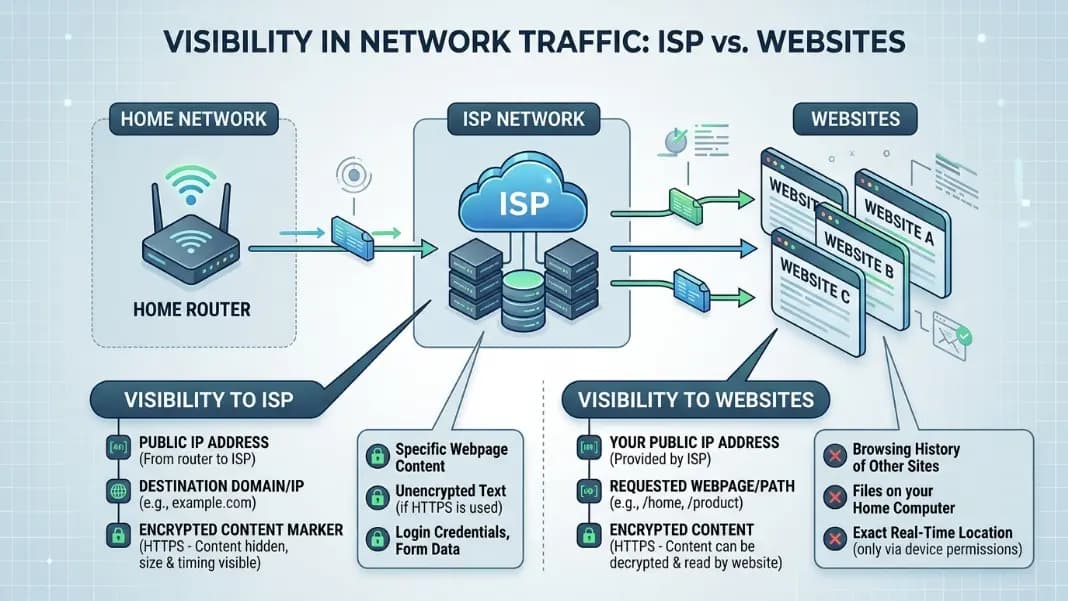
What Your IP Address Cannot Reveal
The limits of IP-based information are as important to understand as the information itself.
Your IP address does not contain your name, email address, phone number, or any personal account information. None of this can be extracted from an IP by any public lookup tool. Connecting your IP to your personal identity requires either your ISP's subscriber records (legally protected and not publicly accessible) or you logging into an account that has your personal information, at which point the site knows who you are because you told them, not because of your IP.
Your IP does not reveal the content of your HTTPS connections. When you visit a site over HTTPS, the connection is encrypted end-to-end. The server knows your IP and the domain they are serving. They do not see the content of other tabs or other websites you have open. Your ISP can see which domains you are connecting to through DNS queries unless you use encrypted DNS, but they cannot see the content of encrypted connections either.
Your IP does not identify your specific device. Multiple devices on the same home network share one public IP. An IP lookup cannot determine whether the connection came from a laptop, a phone, a tablet, or a smart television. Device identification requires other techniques like browser fingerprinting or cookies, which are separate from IP-based identification.
Your browsing history on other sites is not visible through your IP. A site can only see requests made to their own servers. They cannot query other servers to find out where else you have been browsing. Tracking across sites requires third-party scripts, cookies, or fingerprinting techniques that operate at the application layer, not at the IP layer.
How a VPN Changes What Your IP Exposes
A VPN routes your traffic through a server operated by the VPN provider. From the perspective of any website you visit, your public IP is the IP address of that server, not your real home IP. The location, ISP, and connection type information visible in a lookup reflect the VPN server, not you.
This changes the picture in a few specific ways. Websites see a data center IP rather than a residential broadband IP. Streaming services that restrict content geographically see the VPN server's location rather than yours. Fraud prevention systems may flag you as a higher risk because data center IPs are commonly used for automated activity.
What a VPN does not change: your VPN provider can see all the traffic you route through their servers. You have replaced the trust in your ISP with trust in your VPN provider. If the VPN provider logs your activity or is subject to a legal request, the protection is only as strong as their privacy practices and jurisdiction.
Your real IP is still visible to your ISP as the connection going to the VPN server. Your ISP can see that you are using a VPN and approximately how much traffic you are sending, even though they cannot see the content. They cannot see which sites you are visiting through the VPN.
For most users concerned about basic IP-based tracking, a reputable VPN provides meaningful protection. For users with more specific threat models, understanding where the VPN provider fits in the trust chain is necessary before assuming the VPN solves the privacy concern entirely.
Looking Up What Your Own IP Currently Shows
The most practical way to understand what your IP reveals is to look it up yourself. The IP address lookup tool shows you exactly what any server you connect to sees from your IP: your approximate location, your ISP, your connection type, and the autonomous system your IP belongs to.
If the location shown is clearly wrong, that is not a security issue. It is a reflection of how geolocation databases work and where your ISP routes its network traffic. If the ISP name shown is not your actual ISP, you may be connecting through a corporate VPN or a proxy without realizing it.
The full IP lookup guide covers how to read IP lookup results in detail, including what each field means and what the data is actually sourced from. The guide to reverse IP lookup covers the related technique of finding what domain names are associated with a given IP, which is a different kind of lookup useful for investigating server infrastructure.
For anyone who wants to see how their IP lookup result changes when using different networks, running the lookup on home broadband versus a mobile connection versus a workplace network shows clearly how much the result shifts. The developer tools section has the lookup tool alongside other network and security tools for anyone working through a fuller privacy assessment.