Most people picture passwords as strings of random characters: mK9#vRpL3@Xq. These are secure, but they are nearly impossible to remember without a password manager. That creates a real problem for the credentials you actually need to recall: your device login, your password manager master password, or systems where pasting is blocked.
The strong password generator handles random character passwords perfectly. Passphrases solve the other case: passwords that need to be both strong and memorable. Instead of random characters, a passphrase uses a sequence of random common words to achieve high entropy through length rather than complexity. Before diving in, the strong password guide covers the core rules to keep in mind when choosing any type of credential.
This guide covers what passphrases are, why they work, the XKCD method behind them, how to generate one properly, and when to use a passphrase versus a random password.
What is a passphrase password?
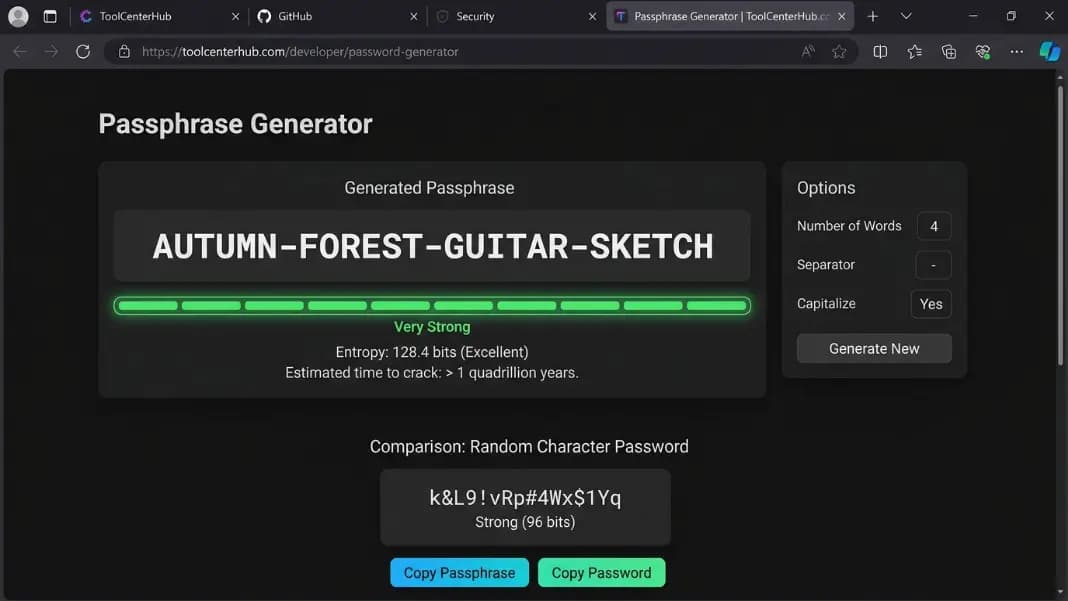
A passphrase is a password built from a sequence of randomly selected common words. Instead of Bq4$Wm8#Kz2@Rp6!, a passphrase looks like purple-cloud-river-bench.
The security comes from two factors working together: the number of words and the randomness of their selection. A single common word is trivially easy to guess. Four or more words chosen at random from a large list become dramatically harder to crack, not because the individual words are complex, but because the number of possible combinations grows exponentially with each added word.
The critical word is "random." A passphrase you construct yourself, picking words that seem unrelated to you, is far weaker than one generated by selecting words from a large list using a cryptographically random process. Your brain is not a random number generator. It reaches for words you know, words you associate with each other, and patterns that feel memorable. Attackers know this and build it into their attack strategies.
A properly generated passphrase has no pattern to exploit. The words share no relationship except that they were all selected by the same random process. The attacker has no shortcut: they must try combinations of words, and the space of possible combinations from even a modest word list is enormous.
Why passphrases are more secure than random passwords
Password strength is measured in bits of entropy. Entropy represents the number of unpredictable random choices that produced the value. More entropy means more possible combinations and more work for any attacker trying to guess it.
A random character password draws from a pool of roughly 95 printable ASCII characters. The entropy per character is log2(95), about 6.5 bits. An 8-character random password gives around 52 bits. A 12-character password gives around 79 bits.
A passphrase draws from a word list. If the list contains 2048 words, each word contributes 11 bits of entropy (log2 of 2048). Four words give 44 bits. Five give 55 bits. Six give 66 bits.
The practical result: a 6-word passphrase from a 2048-word list is roughly as strong as a 10-character random password, but the passphrase is 30 or more characters long. That length matters independently of entropy. Modern cracking tools are heavily optimized for short complex passwords. A long string of common words creates problems for these tools that raw entropy numbers do not fully capture.
The decisive advantage is at the human boundary. Most people can reliably memorize a 5 or 6-word passphrase. Almost nobody can reliably memorize a 16-character random string without writing it down. Writing passwords down undermines security in practice. Passphrases let you stay within human memory limits while achieving strong entropy.
The XKCD password method explained
In 2011, the webcomic XKCD published a strip comparing two passwords. The first was "Tr0ub4dor&3": a dictionary word with predictable substitutions (3 for e, @ for a, capital first letter) plus a number and symbol at the end. Despite looking complex, its entropy was around 28 bits because the base word and every transformation applied to it were guessable patterns that attackers already use in their rulesets.
The second was "correct horse battery staple": four random common words with no relationship. Entropy was around 44 bits. The passphrase was both stronger and far easier to remember.
The insight the strip illustrated: the character complexity requirements most services enforce, uppercase, numbers, symbols, do not add much entropy because users apply them predictably. Everyone capitalizes the first letter. Everyone appends a number at the end. Everyone substitutes @ for a and 3 for e. Every one of these transformations is in every password cracker's default ruleset. The complexity looks real but adds almost nothing that an attacker cannot account for automatically.
True randomness in word selection adds entropy in a way that pattern-matching cannot shortcut. "correct horse battery staple" has no transformation to reverse. The attacker must check word combinations, not character rule variations. For a word list of 2048 entries, four words produces 2048^4 possible combinations: roughly 17.6 trillion. Six words produces over 73 quadrillion combinations.
The method is named after the webcomic but the underlying principle is older. Selecting credentials from a large, well-defined random space has always been the foundation of cryptographic security. The XKCD strip made it intuitive for a general audience by placing the memorability advantage and the security case side by side.
Passphrase vs random password
Neither approach is universally better. They serve different situations.

Where passphrases win:
Passphrases are the right choice for any credential you need to remember or type regularly. Your laptop or device login. The master password for your password manager. A recovery key you might need when your manager is inaccessible. Any system that blocks paste input and requires manual entry.
Where random passwords win:
For any service where you use a password manager to store and paste credentials automatically, a random password from a generator is equally secure and requires zero memorization effort. For these accounts, use the strong password generator to create a 16-character random credential and store it in your manager. For a deeper look at how the two tools complement each other across different credential types, the password manager vs password generator guide covers when each tool does the heavier lifting.
The strongest overall setup combines both: a 6-word passphrase as the master password protecting your password manager, with randomly generated passwords stored inside it for every individual service account. This gives you strong memorized credentials exactly where you need them and maximum-entropy credentials everywhere else.
How to generate a secure passphrase
A passphrase is only as strong as the randomness of its word selection. There are two reliable methods.
Diceware (manual): Diceware is the original passphrase generation method. You roll five physical dice and look up the result in a published word list where each five-digit number maps to a word. Rolling five or six times gives you a five or six-word passphrase. Each word was selected by genuine physical randomness that no software can predict or bias. The Diceware word list is publicly available and has been used for decades.
The manual method is the most verifiable form of passphrase generation because you observe the randomness directly.
Tool-based method: A passphrase generator tool selects words using a cryptographically secure random number generator, the same class of randomness used in the strong password generator for character-based passwords. The result matches the Diceware method in security and is significantly faster.
Either way, the rule is the same: the words must be selected by a random process, not by you. Your intuition about what seems random is not reliable. The security of the passphrase depends entirely on this one condition.
Passphrase examples
The following examples show the format and structure of properly generated passphrases. Do not use these exact values. Generate your own using a random selection method.
4 words (44 bits, minimum):
correct-horse-battery-staple
purple-cloud-river-bench
5 words (55 bits, recommended for most accounts):
bright-forest-window-piano-river
silver-lamp-cloud-tiger-paper
6 words (66 bits, recommended for master passwords):
purple-river-jacket-stone-forest-lamp
moon-tiger-window-bench-silver-cloud
Notice that strong passphrases use common, simple words. Security comes from combining multiple randomly selected words, not from using rare or obscure vocabulary. "moon" and "lamp" are just as valid as any word, provided they were selected randomly.
Passphrases and service password requirements
Many services impose requirements that create friction with passphrases: maximum length limits, rejection of spaces, mandatory special characters. Here is how to handle each.
Maximum length limits: Some older systems cap passwords at 16 to 20 characters. A passphrase of four to five short words fits within these limits. If a service caps at 16 characters, use four short words like moon-lamp-tide-oak (18 characters with separators) and adjust word length accordingly. Services with very short caps should be noted as security risks regardless of which password type you use.
Spaces not allowed: Replace spaces with a hyphen, period, or underscore. moon.lamp.tide.oak works on any system that accepts standard characters.
Special character requirements: Add a digit or symbol as a separator between words. moon-lamp-7-tide-oak satisfies a digit requirement without breaking the passphrase structure or memorability.
Repeated use of the same passphrase: Do not do it. A passphrase compromised in one breach gives attackers access to every account using it, the same as any other reused credential.
Best practices for passphrases
Use at least 5 words for everyday accounts, 6 for master passwords. Four words is a starting point but not a target. Each additional word multiplies the search space by the word list size.
Add a separator with a digit. A hyphen or period between words satisfies most special character requirements. Adding a digit, such as tiger-8-jacket-moon-window, adds entropy and clears numeric requirements on most services.
Never construct passphrases from memory. Song lyrics, book quotes, phrases you find clever: these are all covered by targeted wordlist attacks. Random selection is the only method that produces genuine security.
Test memorability before committing. Say the passphrase out loud several times. Write it down while you memorize it over the next 24 hours. If you cannot recall it reliably after a day without looking, generate a new one. Most 6-word passphrases become memorable quickly because human memory handles word sequences naturally.
Store a fingerprint for verification. If you want a way to verify your passphrase matches an expected value without storing the passphrase itself, run it through the SHA hash generator to produce a SHA-256 hash you can compare against a stored fingerprint.
For the credentials that do not need to be remembered, use a randomly generated password rather than a passphrase. The Developer Tools section includes the password generator and other security utilities for managing the full range of credential requirements you will encounter.