You added a capital letter at the front, changed the o to a zero, and put an exclamation mark at the end. That password was cracked seconds after the database storing it was breached. Not because the attacker was clever, but because every variation of that substitution pattern is already in every wordlist used in automated attacks.
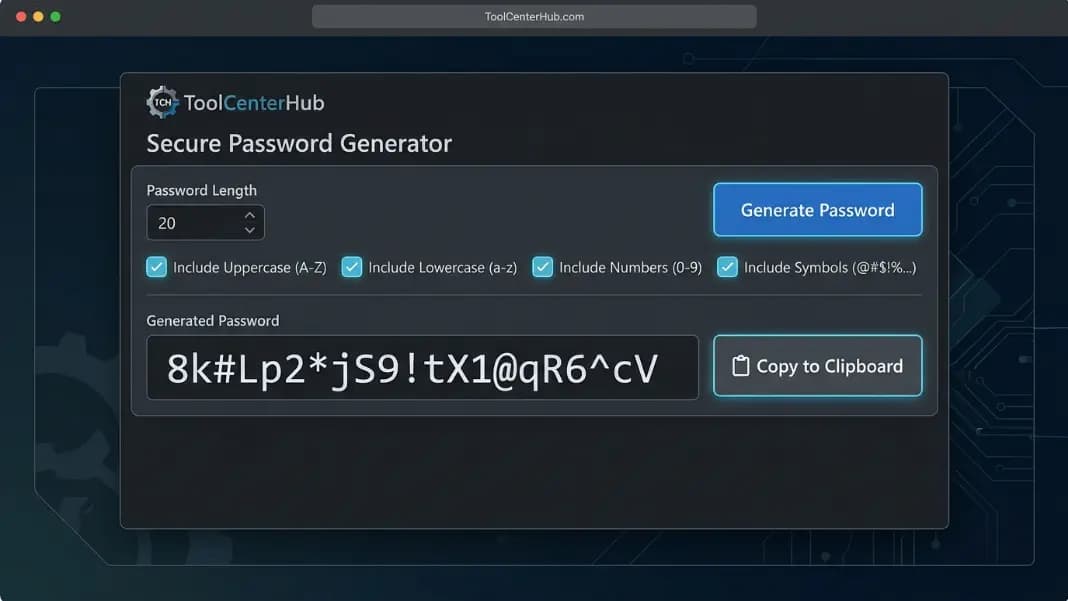
The strong password generator on ToolCenterHub uses a cryptographically secure random source to produce passwords with no exploitable pattern. This post explains what actually separates a secure password from one that only feels secure, how the generator works at the level that matters for security, and what you need to do with a generated password to stay protected after you close the tab.
The distance between "I made a strong password" and "this account is protected" is wider than most people assume, and it comes down to a few decisions that take under a minute to get right.
What actually makes a password strong
A strong password has two properties working together: entropy and unpredictability.
Password entropy is a measure of how many possible combinations an attacker would have to try before finding yours. A single-character password using only lowercase letters has 26 possible values. A 16-character password using uppercase, lowercase, digits, and symbols has approximately 440 quintillion possible values. More possible values means more guessing required.
Unpredictability is separate from entropy, and this is where most passwords fail. A password can score well on an entropy calculation and still be completely predictable. Password123! has twelve characters and includes all four character types. On paper it belongs to a large mathematical space. In practice it appears on every leaked credential list because it matches the substitution pattern millions of people independently converge on.
Genuine strength requires both: enough possible combinations to make exhaustive search impractical, and zero human-chosen structure that attackers can model and shortcut around.
A cryptographically secure random number generator, or CSPRNG, is the only practical way to produce both properties at once. The generator uses the Web Cryptography API's crypto.getRandomValues() function, the browser standard for values an outside observer cannot predict from prior outputs.
How the generator produces output with no exploitable pattern
The generator does not use JavaScript's built-in Math.random() function. That function is a pseudorandom number generator seeded by a deterministic value, often the system clock. Its output can be reconstructed if you know or can approximate the seed. That is a documented attack vector against generators that rely on it.
crypto.getRandomValues() draws entropy from sources the operating system accumulates through hardware events, network timing, and other physical processes that cannot be predicted externally. Each call produces a value with no mathematical relationship to previous calls. There is no pattern to find because there is no pattern in the generation.
When you set the generator to 20 characters with all character types enabled, it draws 20 independent random values from the combined character space and assembles the result. No two consecutive characters have any relationship to each other. No substring is more likely than any other substring of the same length. That independence is exactly what makes the output resistant to pattern-based attacks.
You can verify this informally: generate ten passwords in a row and look for repeated substrings across them. You will not find any.
Character length and how brute force time scales
The relationship between password length and cracking time is exponential, not linear. This is the most important thing to understand about password strength.
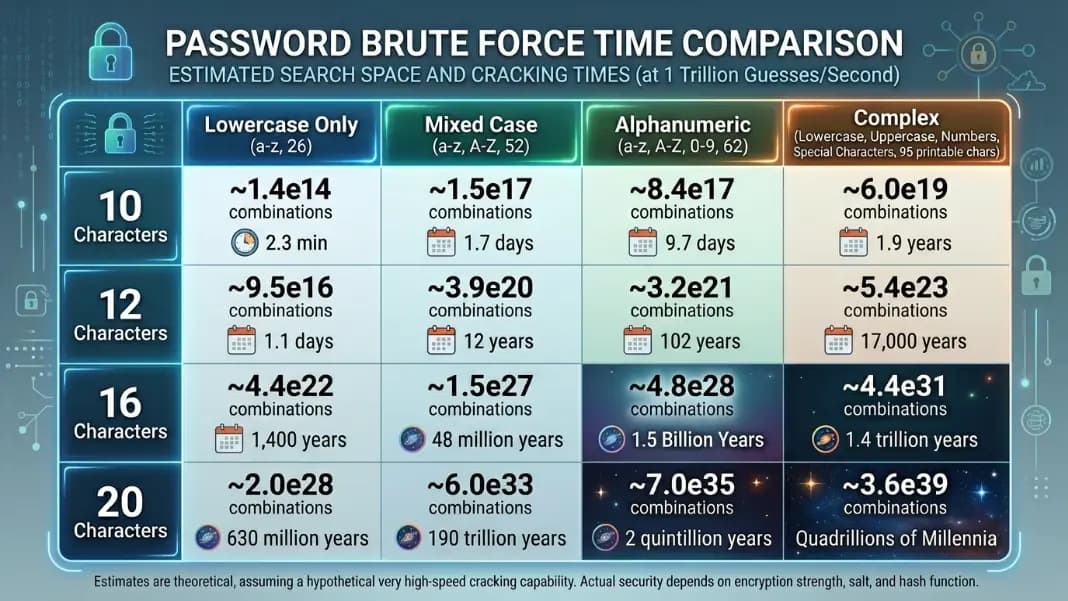
A 10-character password using all four character types (95 possible values per character position) has 95^10 possible combinations. That is roughly 60 trillion. At one billion guesses per second, which is a conservative estimate for modern GPU-based cracking hardware, exhaustive search takes around 16 hours.
A 16-character password has 95^16 possible combinations. That is roughly 440 quintillion. The same hardware would need approximately 14 million years to exhaust that space.
A 20-character password pushes the number past any practical hardware scenario likely to exist in the next several decades.
This is why 16 characters is the minimum worth using. The jump from 12 to 16 is not a marginal improvement. At 12 characters you are in the range where determined attackers with good hardware can break through within weeks given enough time. At 16 you are past any practical attack surface.
Length is also more important than character variety when you can only improve one thing. A 20-character lowercase-only password has more entropy than a 10-character password using every available character type. If a site forces a short maximum length, enable all character types to compensate. If you have the choice of length, prioritize it.
Character sets: how each type multiplies the search space
Each character type you add to the pool multiplies the entropy per character position, not adds to it.
Lowercase letters only: 26 options per character. Uppercase and lowercase: 52 options per character. Letters plus digits: 62 options per character. Letters, digits, and standard symbols: 94 to 96 options per character.
The compounding effect at 16 characters:
| Character set | Combinations | Approximate brute force time at 1 billion/sec |
|---|---|---|
| Lowercase only | 26^16 = 43 billion billion | ~1,370 years |
| Letters only | 52^16 = 52 quadrillion | ~1.6 million years |
| Letters and digits | 62^16 = 47 quadrillion | ~1.5 million years |
| All character types | 95^16 = 440 quintillion | ~14 million years |
Enabling all character types gives you roughly ten thousand times as many combinations as lowercase-only at the same length. Over 16 characters, that turns an already-long attack into one that exceeds any practical threat horizon.
Character sets also defeat rule-based dictionary attacks. Attackers do not just try combinations at random. They run wordlists with transformation rules: capitalize the first letter, substitute @ for a and 3 for e, append common numbers and symbols. A password with no word fragments or recognizable transformation patterns gives these rule sets nothing to work with.
Passphrases vs random passwords: when each is the right choice
Both random passwords and passphrases can be genuinely secure. The question is what you need from the result.
A random password like k8#Wm2Lx!Qv9rB4z has high entropy per character, fits any reasonable field length limit, and leaves no recognizable structure for dictionary attacks. The tradeoff is that it is not memorizable and is frustrating to type manually.
A passphrase like the XKCD-style correct-horse-battery-staple has high entropy per word rather than per character. A four-word passphrase from the Diceware 7,776-word list contains approximately 51 bits of entropy. To match that with random characters, you need around 9 to 10 characters using all four types. Passphrases require more total characters to reach the same security level, but they are manageable to type without a copy-paste workflow.
The direct recommendation: use random passwords for everything that goes into a password manager, which should be most of your accounts. Use a passphrase for the master password of the manager itself, since that is the one password you actually need to type and remember.
For a full look at how passphrases are constructed and how the Diceware method works in practice, see the passphrase password generator guide.
Mistakes that weaken passwords even after using a generator
Generating a strong password is step one. Several common decisions undo the work immediately.
Reusing the same password across sites. If one site is breached, automated tools run the exposed credentials against hundreds of other services within hours. This attack, called credential stuffing, relies entirely on reuse. A unique password per site means a breach at one place costs you that one account, not every account you own. The generator makes this easy: one click per site.
Storing it in plaintext. Anything stored in plaintext is as accessible as the device or account it lives on. A note in a notes app, a line in a spreadsheet, or a message sent to yourself counts as plaintext storage. Use an encrypted password manager.
Generating and not saving. This happens more than you would expect. Someone generates a strong password, sets it on an account, closes the browser tab, and cannot log in the next day. Generate the password, paste it into the manager and the account at the same time, confirm the account accepted it, then close the generator.
Trusting the URL by eye. Password managers with autofill check the domain before filling credentials. A human eye can be fooled by subtle misspellings in URLs. If you paste manually, verify the domain carefully before submitting.
The developer tools collection has other utilities relevant to account security, including a hash generator for checking how sites should be storing your credentials on their end.
How to store a password you cannot memorize
A randomly generated 20-character password is not meant to be memorized. That is not a limitation. It is the point. The workflow depends on a password manager.
A password manager encrypts every credential you store using a master password only you know. Options with long track records include Bitwarden, which is open source with a capable free tier; 1Password, which has a polished cross-device experience on a paid plan; and KeePass, which stores everything locally if you prefer your credentials never touch a cloud server. For a full breakdown of how password managers and generators work together, and when to rely on each, the password manager vs password generator guide covers the distinction in practical terms.
The workflow:
- Open the password generator.
- Set the length to 16 or higher, all character types enabled.
- Generate a password.
- Open your password manager and create a new entry for the site.
- Paste the generated password into both the manager entry and the site's password field simultaneously.
- Save the entry and confirm the site accepted the change.
After the first few runs this takes under thirty seconds. You stop making decisions about what password to use because there is nothing to decide.
When to generate a new password and when not to bother
Mandatory password rotation on a fixed calendar schedule is one of the most persistent security myths. NIST's guidelines in SP 800-63B, updated over several years, explicitly advise against scheduled expiration policies without evidence of compromise. The reason is practical: people forced to change passwords regularly produce incrementally weaker results. Summer2024! becomes Summer2025! becomes Summer2026!. The pattern is trivially predictable.
Change a password when something specific happened:
- The site announces a breach affecting user credentials.
- You used the password on another breached site.
- You shared it with another person for any reason.
- You see login events or account activity you did not initiate.
- You entered it in an unencrypted channel like email or a text message.
When none of those conditions apply, leave it. The value of a strong generated password comes from its randomness and uniqueness. Those properties do not decay over time.
The setup that actually protects accounts is unique, randomly generated passwords per site, stored in an encrypted manager. When those three pieces are in place, a breach at any single site costs you exactly one credential, and replacing it takes the same thirty seconds it took to create it.
For a deeper look at how attackers build wordlists and what methods they apply when trying to crack credentials, see the guide to creating a strong password, which covers dictionary attack structure and the substitution rules that make common password patterns so easy to defeat.