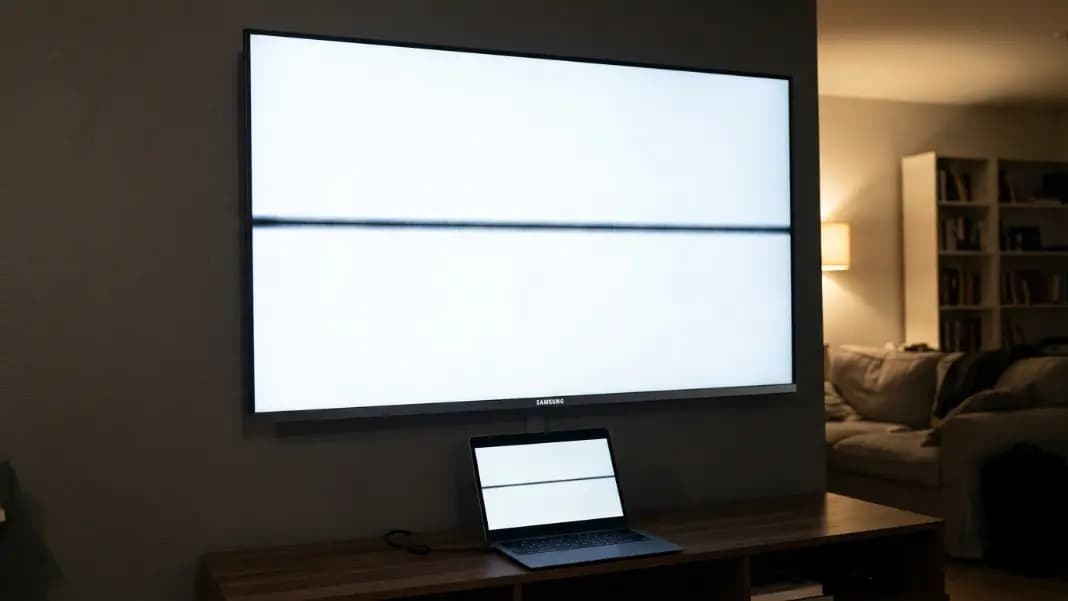
You turned on the Samsung TV and there is a line straight across the screen. Or maybe it is a small fixed black dot in the lower corner that is invisible during dark scenes and obvious the moment a bright scene or menu appears. Either way, something is wrong with the display and it is not going away.
Samsung TV dead pixel issues cover two distinct problems: individual cell failures that appear as isolated dots, and circuit failures that appear as full horizontal or vertical lines. The repair path, the cost, and Samsung's warranty response are different for each, so correctly identifying which type you have is the first step. Connect a laptop or streaming stick to the TV via HDMI, open the dead pixel test in a browser, and play it fullscreen on the TV. The solid color backgrounds will make both types of defect visible within a few minutes.
If what you see is a line rather than a dot, the news is actually better than it looks. Lines on Samsung TVs are most often a T-con board failure rather than panel damage, and T-con boards are replaceable components that cost far less than a new screen.
How Dead Pixels Appear on Samsung TVs vs Other Displays
A Samsung TV panel is a large LCD or OLED display operating at the same fundamental level as a laptop screen or computer monitor. Individual dead pixels from cell failure look exactly the same: sharp black dots visible on light backgrounds and invisible on black.
What makes Samsung TV dead pixels different in practice is scale. A single dead pixel on a 65-inch 4K Samsung TV is physically smaller than a dead pixel on a 15-inch laptop screen, because the 4K panel packs 8.3 million pixels across a much larger surface. From a normal TV viewing distance of 8 to 10 feet, a single dead pixel on a 4K TV is often not visible at all unless you are specifically looking for it up close. On a 1080p TV of the same size, the individual pixels are four times larger, making a single dead pixel more noticeable.
This has a direct implication for warranty claims. A dead pixel that you can only see when standing two feet from the screen may not qualify for Samsung's replacement threshold even if it is technically a manufacturing defect. The location and visibility matter as much as the count.
Samsung produces both LCD and OLED TV panels. The Neo QLED and standard QLED lines use LCD panels with quantum dot enhancement. The Samsung S95 OLED line uses OLED panels. Dead pixels on Samsung OLED TVs behave like dead pixels on any OLED display: true black dead pixels from complete subpixel failure are rare, while stuck bright pixels are more common. The same test approach works on both.
The T-Con Board: Why Dead Pixel Lines Are Different from Dead Pixel Dots
A T-con board (timing controller board) manages the signal delivery to every row and column of pixels in a Samsung TV. It sits as a separate replaceable board behind the panel, connected by ribbon cables on both sides.
When a T-con board output channel fails, the entire row or column that channel controls loses its signal. Every pixel in that row or column goes dark simultaneously. The result is a straight horizontal or vertical line running edge to edge across the screen. A horizontal line means a row driver failed. A vertical line means a column driver failed.
This is completely different from an individual dead pixel, where one cell has failed independently. A line means a shared circuit. A dot means a single cell.
The diagnostic test is straightforward. Gently press on the back of the TV near the T-con board area (typically center-back on most Samsung models) while the screen is on and showing the line. If the line flickers, shifts, or temporarily disappears, the connection between the ribbon cable and the T-con board is intermittent and the fix may be as simple as reseating the cable. If pressing produces no change, the T-con board itself has failed.
For the full diagnostic process and repair cost breakdown for dead pixel lines on any display, the dead pixel line guide covers T-con board replacement, ribbon cable replacement, and when the failure is inside the panel itself.
How to Test a Samsung TV for Dead Pixels Properly
Testing a TV for dead pixels requires a fullscreen solid color source. The TV's own menu and interface do not show pixel defects because menu elements are too small and complex.
Connect a laptop to the Samsung TV using an HDMI cable. Set the TV input to the laptop's HDMI source. Open the dead pixel test tool in a browser on the laptop and put it in fullscreen. The tool's solid color backgrounds will fill the entire TV screen.
Cycle through black, white, red, green, and blue. For each color, scan the screen methodically from one side to the other. Start at close range to spot small defects, then step back to normal viewing distance to see whether larger-area issues like T-con failures are visible.
On black: a line or dot that glows any color is a stuck pixel. On white: black dots are dead pixels. Black lines are T-con or cable failures. On the color backgrounds: dead pixels appear black against each color. A dead subpixel shows an unexpected color on specific backgrounds. A cyan dot on a red background means the red subpixel has failed for that pixel.
Take a video with your phone of the defect on the white background and the black background before contacting Samsung. Video documentation is more persuasive than still photos for TV defects because it shows the defect under different content conditions.

Samsung's Dead Pixel Policy and Warranty Coverage
Samsung's standard warranty for TVs is one year from the date of purchase in the United States. Dead pixels from manufacturing defects are covered under this warranty.
Samsung's replacement threshold for TVs is higher than for most laptop or monitor manufacturers. Under Samsung's standard policy, five or more dead pixels are typically required before a panel replacement is authorized as a warranty repair. A single dead pixel on a 65-inch TV is unlikely to qualify for panel replacement under the standard policy.
A dead pixel line is treated differently. A full horizontal or vertical line on a TV represents a circuit failure rather than a random manufacturing defect, and Samsung typically authorizes repair for line defects with fewer restrictions than for isolated dot defects. This is where diagnosing whether you have a T-con board failure rather than a panel failure matters: a T-con repair costs Samsung or its service partner far less than a panel replacement, which makes authorization easier.
Samsung's warranty service process: register the TV in your Samsung account, contact Samsung support through the app or website, describe the defect with model number and purchase date, and send photos. Samsung sends a technician for in-home service on large TVs rather than requiring you to transport the set. The technician brings replacement components and performs the repair on-site.
If the TV is out of warranty, Samsung's out-of-warranty service is expensive. Panel replacements on a 65-inch Samsung TV can cost $600 to $1,000 or more for parts and labor. For older TVs where the replacement cost exceeds 60 percent of the TV's current value, replacement of the TV is the more economical choice.
Third-Party Repair: T-Con Board Replacement Is Often DIY-Viable
If the Samsung TV is out of warranty and the failure is a T-con board, this is one of the few TV repairs that is genuinely accessible to someone with basic tools and patience.
T-con boards for most Samsung TV models are available on eBay, Amazon, and electronics parts suppliers for $20 to $80. The board is model-specific, so confirm the exact board part number from the label on the existing board before ordering. The repair process:
- Unplug the TV and lay it face-down on a soft surface
- Remove the back panel screws and lift the back panel
- Disconnect the ribbon cables on both sides of the T-con board
- Unscrew the board and remove it
- Install the replacement board, reconnect the ribbon cables, and reassemble
The ribbon cable connections are the most fragile part. They use zero-insertion-force connectors that lock with a small plastic tab. Forcing a connector risks breaking the tab and creating a new problem. Handle these gently.
This repair has been completed by thousands of Samsung TV owners with no prior electronics experience, and model-specific repair guides for most popular Samsung models are available on YouTube and iFixit. If the T-con board fix does not resolve the line, the failure is in the panel itself, and panel replacement by a professional is the next option.
When a Samsung TV Dead Pixel Warrants Replacement vs Repair
Single dead pixel, TV is under one year old: file a warranty claim regardless of whether Samsung's threshold is met. Document thoroughly and escalate if the initial response is denial.
Dead pixel line, TV is under one year old: file the warranty claim immediately. Lines qualify more easily than dots under Samsung's policy.
Dead pixel line, TV is out of warranty: research the specific T-con board part for your model. If the board is available for under $80 and your TV is worth keeping, the DIY repair is worth attempting. A professional repair shop charges $100 to $200 labor for a T-con swap on top of parts.
Multiple scattered dead pixels, TV is out of warranty: weigh the panel replacement cost against the TV's current value. A $700 panel repair on a five-year-old TV that cost $900 new is rarely worth it. A $700 panel repair on a two-year-old premium TV worth $1,200 is.
The dead pixel test guide covers what each major manufacturer, including Samsung, LG, and Sony, requires before authorizing a warranty replacement. Use that breakdown alongside your TV's specific model documentation to build the strongest possible warranty case before contacting Samsung support. All testing tools are in the developer section.