You found one dead pixel last week. Now it might be two. Either you are looking more carefully than before, or your screen is getting worse. That difference matters, because one situation requires action and the other does not.
Dead pixels on a laptop screen spreading on their own is not how pixel failures work. A dead pixel is a transistor failure at one specific cell. That failed transistor cannot pass its failure to the cells next to it. What actually causes a dead pixel count to rise is almost always an external factor: physical pressure, a manufacturing defect larger than what was first visible, or a cable problem that was never limited to a single column. Before drawing any conclusions, confirm you are looking at genuine pixel failures by running the dead pixel test across every solid color background.
Understanding what is actually happening also matters for warranty documentation. A cluster that grew over three weeks points to ongoing damage. A single stable pixel that has not changed in four months is a manufacturing defect. Both can qualify for replacement under the right policy, but the evidence you present looks completely different for each case.
Dead Pixels Almost Never Spread Without a Reason
A dead pixel is a permanent failure of one liquid crystal cell. Each cell on an LCD screen is controlled by its own thin-film transistor. When that transistor fails, the cell receives no voltage and stays dark. The failure is electrical and completely localized to that one transistor.
Nothing about a failed transistor causes neighboring transistors to fail. They do not share power in a way that would cascade. They do not produce heat that degrades adjacent cells. For a detailed look at exactly what is happening inside the panel when a pixel dies, see what is a dead pixel.
A dead pixel sitting undisturbed on your screen has no mechanism to create a new dead pixel next to it. This means the question "do dead pixels spread" has a direct answer: they do not. What grows is new damage from external causes that happens to create additional dead pixels near existing ones. Two dead pixels close together could be one defect that worsened, two independent failures near the same spot, or physical damage that affected both cells simultaneously. From outside the panel, you cannot determine which without examining the cause.
If you have a single dead pixel that has been in the exact same position for two to three months with no new dots appearing anywhere near it, it is stable. Most stable single-pixel defects remain that way for the life of the device. Monitoring it is reasonable. Worrying about it daily is not.
Pressure Is How One Dead Pixel Becomes Five
Physical pressure on an LCD screen is the most common reason a dead pixel count increases in a short period.
LCD panels are built in layers: a glass substrate, a liquid crystal layer, color filters, and a backlight diffuser. The liquid crystal layer is designed to sit flat and undisturbed between two panes of glass. When you apply pressure to the outer glass, you compress the layers at that point. Enough compression destroys the liquid crystal material at those cells or permanently damages their electrical connections. The cells that absorb that pressure go dark.
The part that confuses people is timing. Pressure damage does not always appear immediately. A laptop pushed into a bag with a USB hub pressing against the lid may not show visible damage that day. The full extent of the damage can take two to five days to develop into visible black dots as affected cells progressively lose their voltage response. So you see one dead pixel on Monday. By Thursday there are four. That sequence looks like spreading. In reality, all four cells likely failed at the same moment on Saturday in the bag.
Common pressure sources that most people do not connect to dead pixels:
- Carrying a laptop with one hand pressing on the lid center
- Placing the laptop in a sleeve where the power adapter presses against the screen face
- A pen, cable, or charger caught between the keyboard and screen when the lid closes
- Stacking anything flat and heavy on top of a closed laptop bag
Check your daily habits before concluding the screen is deteriorating on its own. If you recently changed how you carry the laptop or got a new bag and the dead pixel count increased shortly after, those two events are worth connecting.
Manufacturing Defects That Look Like Spreading
Some screens have a defect zone from the factory that is larger than what becomes visible immediately. The initial dead pixel you notice is the first cell in that zone to fail under normal electrical load. The surrounding cells in the same degraded area follow over days or weeks as they reach the same failure threshold.
This pattern looks like spreading from the outside. The count goes up gradually, new dots appear close to the original point, and the cluster grows over several weeks before stabilizing. But the defect was always there. Every cell that eventually goes dark was already compromised at manufacture. You are watching a predetermined failure sequence, not a growing problem.
Manufacturing defect zones produce clusters with irregular shapes, not straight lines. New dead pixels appear close to the original point rather than extending outward in a clean row or column. This contrasts with circuit failures, which produce perfectly straight horizontal or vertical lines that span the full width or height of the screen.
This distinction matters for warranty. A defect that was present at manufacture and became visible gradually is typically covered as a manufacturing defect even if you noticed it several weeks after purchase. Documenting the cluster's shape, noting the irregular spread pattern, and showing no physical trauma to the screen builds a strong argument for manufacturing coverage. Brands that require a minimum dead pixel count before replacement, such as Samsung, may cover a growing cluster once it crosses their threshold even if the visible defect appeared after the initial purchase period.
Cable and Circuit Failures That Mimic Additional Dead Pixels
Not every growing dead pixel pattern comes from individual cell failures. Some patterns that appear to be a spreading cluster are actually the early stages of a cable or T-con board failure showing up as isolated dark dots before it worsens into full lines.
A ribbon cable in a laptop hinge flexes with every open-and-close cycle. Conductors inside the cable develop micro-tears gradually over thousands of cycles. One failing conductor kills the signal for one entire column of pixels. As more conductors in the same cable area fail over time, more columns go dark. The early stage of this failure can produce what looks like a cluster of dead pixels near the hinge side of the screen, before full vertical column lines appear.
The test to tell the difference is simple. Slowly flex the laptop lid while watching the affected area on a dark background. A cable failure often flickers, shifts position, or briefly changes the pattern as the cable bends at a different angle. A genuine dead pixel cluster stays perfectly identical regardless of lid position or movement. Physical movement does not change a cell-level dead pixel.
The dead pixel line guide covers how to diagnose cable failures in detail, what the repair costs look like for ribbon cable replacement, and when the pattern points to a T-con board failure rather than the cable itself.

How to Track Whether Your Screen Is Getting Worse
The most reliable way to know if a dead pixel count is growing is to take structured photographs rather than relying on visual memory.
Open a solid white background using the dead pixel test white screen mode or a blank document at maximum brightness. Use your phone to photograph the affected area at the same zoom level from the same position each time. Save each photo with the date visible, either in the filename or by enabling your phone's timestamp display.
Check every five to seven days. Daily comparison creates false urgency because human perception is not reliable enough to notice one-pixel differences without a side-by-side photo comparison. A week between photos catches any real change while giving you usable documentation.
If the cluster is the same shape and size across four to six weeks of photos, it is stable. If new dots appeared at the cluster's edges compared to your first reference photo, you have documented evidence of change. Save those photos. Include them in any warranty claim submission. A manufacturer that requires documented proof of a manufacturing defect cannot easily argue against timestamped photographs showing the cluster growing over a specific period.
If you photograph the defect and find that it looks exactly the same from the first photo to the most recent one, stop checking. The screen is not getting worse, and continued monitoring is not going to produce a different answer.
Dead Pixels Spreading on TVs and Phones
TVs and phones follow the same principle as laptops: individual dead cells do not spread their failure to neighboring cells.
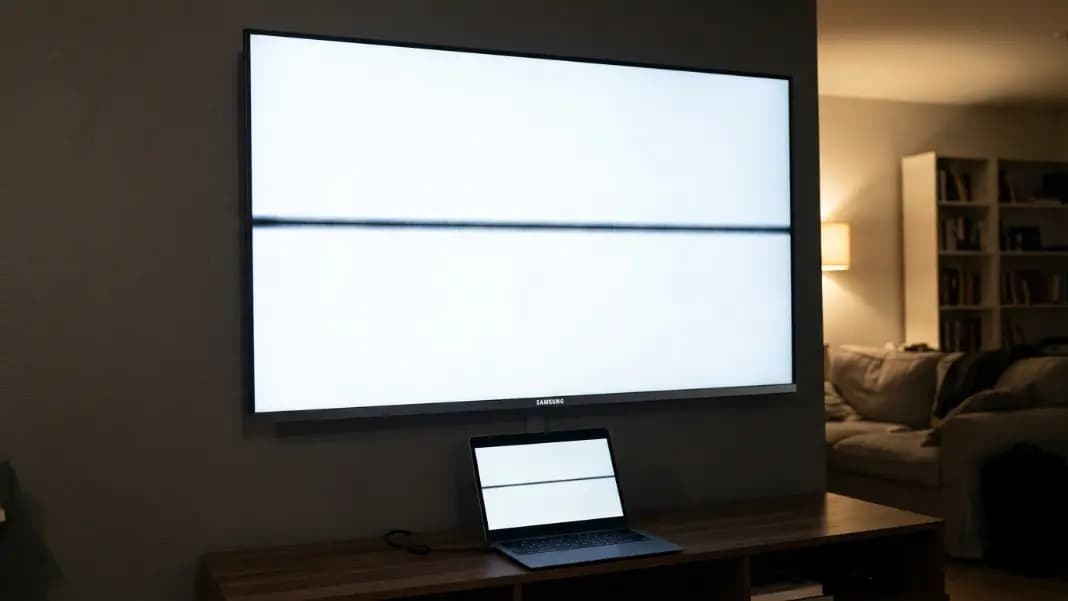
A single dead pixel on a large TV is a localized failure. Under normal use conditions, with no physical pressure on the panel, it will stay exactly where it is. What often gets mistaken for spreading on TV screens is a T-con board progressively failing. Samsung TVs use T-con boards as separate swappable modules behind the panel. A board starting to fail may produce one faint horizontal line at first, then additional lines over several months. Each new line appears to be the problem getting worse, but it is the board affecting more output channels, not pixel cells spreading outward from each other.
On phones, the risk of pressure damage is higher because phones are dropped, bent, and compressed in pockets alongside keys and coins far more often than laptops. An OLED phone that develops a dim colored area over time is more likely showing burn-in from static content than spreading dead pixels. Burn-in and dead pixels look different: burn-in appears as a faint ghost of an interface element, while a dead pixel is a sharp solid black dot with clean pixel-defined edges. The dead pixel test guide covers how to distinguish these on phone screens.
On iPhones specifically, dead pixels from transistor failure are uncommon because OLED iPhones fail differently, usually as stuck or dim pixels rather than completely dark ones. A growing dark area on an iPhone screen is more likely pressure damage, burn-in, or a display cable problem than dead pixels spontaneously spreading.
When the Pixel Count Matters for Warranty and What to Document
Most manufacturer warranties require a minimum number of dead pixels before screen replacement is covered. A single dead pixel in a corner rarely qualifies automatically. Five dead pixels near the center of the screen typically does. A cluster that grew from one to five over a documented period can qualify even if the starting count was below the threshold, because the documentation shows a progressive manufacturing defect.
When filing a warranty claim, bring this documentation:
- Photographs of the defect on white, black, and at least one colored background
- The date you first noticed the defect and each subsequent count
- Timestamped photos showing whether and how the count changed over time
- A description of whether any physical damage occurred during the period
If a manufacturer denies a claim based on pixel count and your documented photos show the count increased past their threshold after the denial, escalate through their formal complaints process. An escalation with photographic evidence that the defect progressed past the replacement threshold is a much stronger position than the original single-pixel report.
A stable dead pixel that has not changed in months is almost certainly a manufacturing defect at a single cell. Whether it meets your manufacturer's replacement threshold depends on its position and the brand's specific policy. The full brand-by-brand breakdown is in the developer tools section, which also has the dead pixel test ready to run whenever you need to recheck the current count.