You are filling out a form that asks for your age in years and months. You know you are 30 but you stop at the months field. Your birthday was in October. Is it 7 months ago? 8? You pull out your phone, do some rough arithmetic, and end up with a number that might be right.
This happens constantly: medical intake forms, insurance applications, passport renewals, sports eligibility checks, and legal documents all want precise dates rather than a rounded whole number. Knowing you are "30 years old" is not the same as knowing you are 30 years, 7 months, and 25 days old.
The age calculator at ToolCenterHub takes your date of birth and returns your exact chronological age in years, months, and days as of today, or any date you choose. It also shows the total in weeks, hours, minutes, and seconds, includes an age gap calculator for comparing two birth dates, displays your Korean age and zodiac sign, and shows a birthday countdown. Enter your date of birth and all results appear immediately with no account required.
This guide covers how the calculation works, how to do it manually with a worked example, what the age gap calculator actually outputs, how Korean age differs from the international system, and how to replicate the result in Excel.
What the age calculator shows you beyond a whole number
Most people know their age in full years. The age calculator shows you something more specific: your exact position in time from birth to right now.
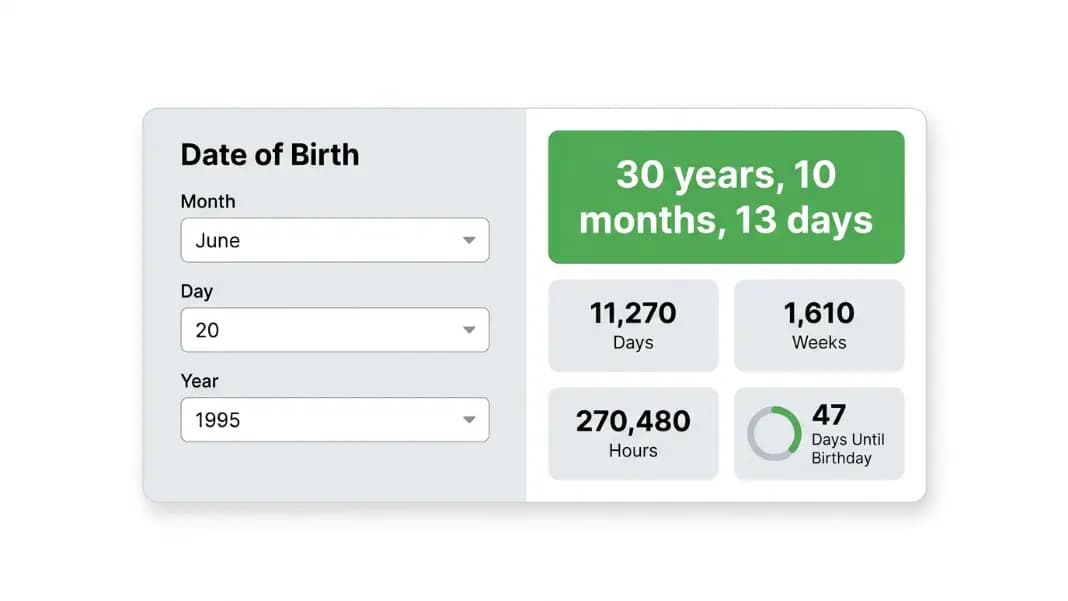
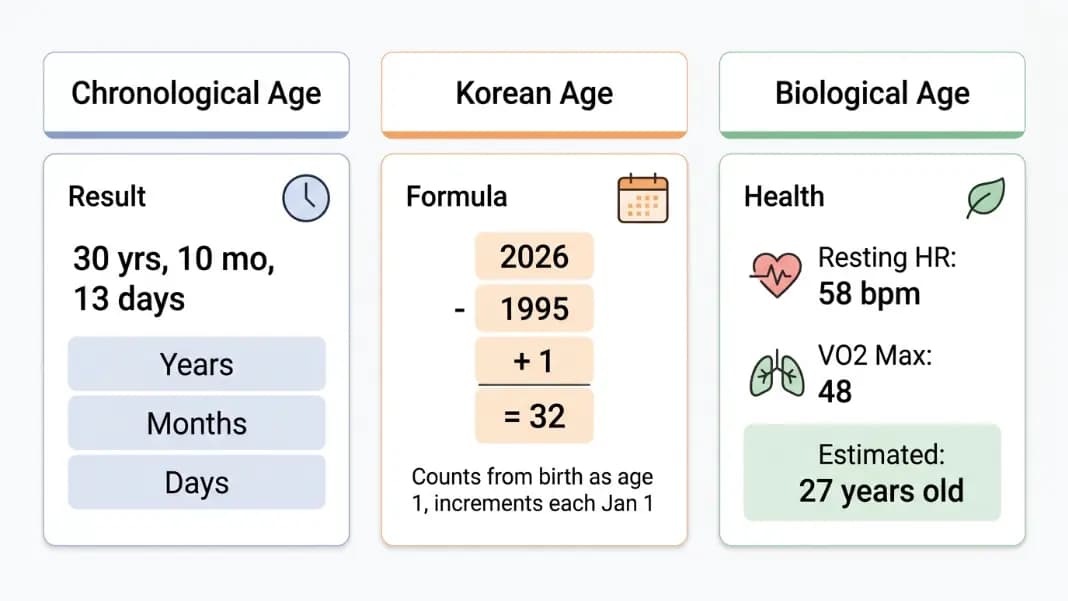
The main output is your exact chronological age in years, months, and days. This is the number used in official and medical contexts. It is not an estimate or a rounding. If you were born June 20, 1995 and today is May 3, 2026, you are not 30, you are 30 years, 10 months, and 13 days old. That precision matters when someone asks how old you were when something happened, or whether you meet an age cutoff by a specific date.
Below the main result, the calculator shows your age translated into other units. A 30-year-old has lived roughly 11,000 days. Seeing that number next to years and months makes the scale concrete in a way that "30" does not.
The birthday countdown ring fills as the year progresses, showing how many days remain until your next birthday. This is useful when checking how long you have before an age-based eligibility threshold, planning a celebration, or simply satisfying curiosity.
The age gap calculator tab takes two birth dates and shows the exact difference between them in years, months, days, total weeks, and total days. It also shows the current chronological age of each person.
The Korean age display appears in the Quick Info panel alongside your zodiac sign and the day of the week you were born. Korean age follows different rules from the international system, which the section below explains in full.
The formula for calculating age from date of birth
Calculating age to the day requires calendar arithmetic. You cannot simply subtract two dates as raw numbers because months have different lengths and February sometimes has 29 days instead of 28. The correct approach works in three stages.
Stage 1: Count complete years.
Subtract the birth year from the current year. Then check: has the birthday occurred yet this year? Compare the birth month and day against today's month and day. If the birthday is still to come this year (the birth month/day is after today's month/day), subtract 1. The result is the age in complete years.
Stage 2: Count remaining complete months.
Starting from the most recent birthday, count how many full calendar months have passed up to today. A month is complete only when the equivalent date in the following month has been reached. If your birthday is October 14 and today is June 8, you count November, December, January, February, March, April, and May. That is 7 complete months.
Stage 3: Count remaining days.
After the last complete month, count from the start of the current incomplete month to today. If the most recent complete month-mark was May 14 and today is June 8, the remaining days are from May 14 to June 8: 25 days.
The edge cases that produce wrong answers are months with different day counts (April ends on the 30th, not the 31st) and the February 28/29 transition in years around leap years. The age calculator handles all of these automatically. Doing it manually requires careful attention to the calendar each time.
How to calculate your age manually: a worked example
Here is a complete manual calculation to show how the three stages work with a real date.
Person: Born October 14, 1988. Today: June 8, 2026.
Stage 1: 2026 minus 1988 = 38. Today is June 8. The birthday is October 14. October 14, 2026 has not yet occurred, so subtract 1. Age in complete years: 37 years.
Stage 2: Count full months from October 14, 2025 to June 8, 2026. November 14, December 14, January 14, February 14, March 14, April 14, May 14. That is 7 complete month-marks. The next mark (June 14) has not been reached. Remaining months: 7 months.
Stage 3: The last complete month-mark was May 14, 2026. From May 14 to June 8 is 25 days. Remaining days: 25 days.
Result: 37 years, 7 months, 25 days.
Two mistakes are common in manual calculations. First, people count the current partial month as complete. If today is June 8 and the birth day is the 14th, June has not yet produced a complete month. Second, people forget to check whether the birthday has passed in the current calendar year before adjusting the year count. Both errors produce a result that is off by a full year. The online age calculator eliminates both sources of error automatically.
Age gap calculator: finding the exact difference between two people
The age gap calculator answers a different question from the main tool. Instead of "how old am I," it answers "exactly how much older or younger is one person than another."
You might assume this is straightforward, but the same edge cases that complicate individual age calculations also affect age gap calculations. Two people born six months apart in different years may have a gap that reads as 0 years and 6 months or 0 years and 5 months depending on how many days each month contains. The calculator handles this correctly.
Common uses for the age gap calculator:
Medical and clinical contexts: pediatric development benchmarks compare a child's milestones against norms for their exact age in months, which means parents comparing two siblings need the gap in months, not just years.
Legal eligibility: some jurisdictions define eligibility based on a minimum age difference between parties. Knowing the gap to the day prevents misinterpretation.
Genealogy research: when tracing historical records, the gap between two recorded birth dates helps verify whether a claimed family relationship is plausible.
HR and pension calculations: retirement eligibility thresholds are often defined as "on or after the date the employee reaches age X," which requires knowing the exact date they cross the threshold.
Enter both dates of birth in the Age Gap Calculator tab. The output shows who is older, the difference in years, months, and days, and the total difference in days and weeks. The current age of each person also appears, which is helpful when comparing ages at a specific moment rather than just the gap.
For calculating how old someone was at a specific point in the past rather than today, use the "Calculate age at a specific date" toggle on the main tab. Enter the target date and the calculator shows the age at that exact point. This works for finding how old a person was when they graduated, immigrated, or reached a recorded milestone in a historical document.
For pregnancy contexts, combining the age calculator with the pregnancy due date calculator gives a complete picture: the gestational age by a given date and the expected birth date from which chronological age will be counted.
Chronological age vs biological age: what this calculator measures
The age calculator measures chronological age: the exact amount of calendar time that has elapsed since the date of birth. This is objective and fixed. Given a birth date and a target date, there is exactly one correct chronological age, and it does not vary based on health, fitness, or lifestyle.
Biological age is different. It is not a fixed number. It estimates how old the body functions physiologically, based on a range of measurable markers: resting heart rate, VO2 max, telomere length, C-reactive protein (an inflammation marker), bone density, and metabolic rate. Two people who are both chronologically 45 can have biological ages of 37 and 56 depending on their exercise history, diet, sleep quality, and genetic factors.
Why does this distinction matter for a tool that only measures chronological age? Because most health reference ranges are calibrated against chronological age, and knowing your exact chronological age ensures you are using the right numbers.
The Mifflin-St Jeor equation used by TDEE calculators to estimate daily calorie needs includes age as a direct variable. It subtracts approximately 5 calories per day from the base metabolic rate for each additional year of age in men, with a similar adjustment for women. A 25-year-old and a 55-year-old with identical height and weight will have meaningfully different calorie targets.
Pediatric BMI reference ranges use age in months rather than years for children under 2, and age in years for children between 2 and 20. An adult BMI calculator uses the standard BMI formula, but knowing your exact age helps when you are near an age boundary and want to use the most applicable reference range.
Sleep requirements shift with age. The National Sleep Foundation specifies 8 to 10 hours for teenagers, 7 to 9 hours for adults 18 to 64, and 7 to 8 hours for adults 65 and older. A person at exactly 65 years old is at the boundary between two guidelines. Knowing the exact age in years matters here.
Korean age: why it runs 1 to 2 years higher than your international age
Korean traditional age, written as 세는 나이 (seineun nai), follows counting rules that differ from the international system in two fundamental ways.
Everyone starts at 1 at birth, not 0. The reasoning is that the period in the womb counts as the first year of existence. There is no "0 years old" in the traditional Korean system.
Age increases on January 1 each year, not on individual birthdays. If you are born on December 28, you are Korean age 1 at birth. Three days later, on January 1, you become Korean age 2, even though you are only 3 days old by international standards.
The formula is: Korean age = current year minus birth year plus 1.
A person born September 15, 1998 is Korean age 29 in 2026 (2026 minus 1998 plus 1 = 29). Their international chronological age on June 8, 2026 is 27 years and 8 months. The gap is typically 1 year for most of the calendar, widening to 2 years briefly after January 1 for people whose birthday has not yet passed in the new year.
South Korea officially replaced the traditional system with the international standard in June 2023 for all legal and administrative purposes. Medical records, government identification, and legal contracts now use chronological age. The traditional Korean age remains in common use in social conversation, entertainment, and informal settings. Many Koreans under 40 are comfortable with both systems and will switch depending on context.
The age calculator displays Korean age in the Quick Info panel alongside your zodiac sign, the day of the week you were born, and the Chinese zodiac animal for your birth year.
How to calculate age in Excel using DATEDIF
Excel includes a function called DATEDIF that was inherited from Lotus 1-2-3 and intentionally left out of the official help documentation. Despite this, it works correctly in all modern versions of Excel, as well as in Google Sheets. It is the right tool for age calculations because it handles the variable length of months and leap years correctly, unlike simpler date arithmetic.
Assume the date of birth is in cell A1.
Age in complete years only:
=DATEDIF(A1, TODAY(), "Y")
Remaining months after full years (not total months, just the remainder):
=DATEDIF(A1, TODAY(), "YM")
Remaining days after full months (just the remainder):
=DATEDIF(A1, TODAY(), "MD")
Full combined result as text:
=DATEDIF(A1,TODAY(),"Y")&" years, "&DATEDIF(A1,TODAY(),"YM")&" months, "&DATEDIF(A1,TODAY(),"MD")&" days"
Quick approximate age in decimal years:
=INT((TODAY()-A1)/365.25)
The argument codes: "Y" returns complete years, "YM" returns months remaining after subtracting complete years, "MD" returns days remaining after subtracting complete months. This is why all three are needed for a full result: each strips out the larger unit before counting the smaller remainder.
The approximate formula using 365.25 is accurate enough for most purposes but drifts slightly around birthday months near leap years. The DATEDIF approach is exact.
For Google Sheets, the DATEDIF syntax is identical. If the birth date is stored as text rather than a date value, wrap it in DATEVALUE() first: =DATEDIF(DATEVALUE("1990-06-15"), TODAY(), "Y").
Why exact age matters for health and fitness calculations
Getting age right to the year is usually sufficient for everyday purposes. Getting it right to the month and day starts to matter when you are near the boundary between two reference ranges or when a calculation compounds small differences over time.
Water intake targets: The water intake calculator generates a daily hydration target based on body weight and activity level. Older adults are at higher risk of dehydration because kidney function declines with age and thirst sensation arrives later than actual dehydration. Knowing whether you are 63 or 64 may not change your hydration target, but knowing you are in the older adult bracket changes how cautiously you should track intake.
Calorie and energy needs: The Mifflin-St Jeor equation uses age as one of four variables alongside weight, height, and sex. The age term reduces estimated basal metabolic rate by a small but meaningful amount each year. Over a decade, the difference between a 25-year-old's and a 35-year-old's calculated TDEE for the same body can reach 50 to 100 calories per day. Use the TDEE calculator with your exact age for the most accurate estimate of daily energy needs.
Body fat percentage norms: Healthy body fat ranges shift with age. A 25% body fat reading is considered healthy for a 40-year-old woman but would indicate excess fat for a 20-year-old woman using the same height and weight. The body fat calculator uses age-adjusted reference ranges for this reason. The exact year matters when you are near a decade boundary.
Medication dosing: Several drug classes, particularly antibiotics, anticoagulants, and some cardiovascular medications, have age-adjusted dosing protocols that change at specific birthday thresholds such as 65 or 70. Medical practitioners use chronological age to the day for this purpose.
These all start with knowing the right number. A rough "I'm 30-something" works for casual conversation. For any calculation that multiplies small errors over time or uses discrete threshold values, the exact date matters.
The age calculator gives you that exact number, whether you need it for a health form, a birthday countdown, a Korean age conversation, or a DATEDIF formula in a spreadsheet. Enter your birth date and the full result is immediate.